LinkedIn Message Automation: The Why, Whats & Hows (2026)

Manual LinkedIn outreach has a hard ceiling.
You can personalize a few dozen messages a day before the quality drops, follow-ups slip through the cracks, and the leads you forgot to chase close with someone else.
LinkedIn message automation removes that ceiling: software runs your connection requests, openers, and timed follow-ups from your account, personalized per lead and paced to stay inside LinkedIn’s limits so your account stays safe.
With LinkedIn automation tools like Expandi, one campaign can handle your whole outreach funnel. We analyzed 70,000+ outreach campaigns from Expandi users — from founders sending their first sequences to SDRs and RevOps leaders running outbound at scale — for our State of LinkedIn Outreach report.
The verdict: automation wins when it scales personalization and backfires when it replaces it. Expandi accounts averaged a 29.61% connection-acceptance rate, and the ones that personalize at scale turn those connections into booked meetings.
Below, you’ll learn more about why LinkedIn automation beats manual sending and cold email in 2026, what LinkedIn message automation does, and how to automate LinkedIn messages safely.
Key Takeaways
- LinkedIn message automation sends your connection requests, openers, and follow-ups automatically, personalized per lead, so outreach runs without you living in the inbox.
- It pays off because LinkedIn beats email for replies: our State of LinkedIn Outreach report found a 10.3% average DM reply rate versus 5.1% for cold email.
- It’s safe in 2026 when the tool runs from a dedicated cloud IP, behaves like a human, and respects LinkedIn’s limits.
- Expandi runs these as smart sequences from cloud-based, dedicated-IP profiles, with an AI Analyzer that writes and scores your messages — the setup that turns warm outreach into booked meetings.
Why automate LinkedIn messages in 2026?
The simplest answer is reply rates. After analyzing 70,000+ real outreach campaigns for our State of LinkedIn Outreach Report, we found the average LinkedIn DM reply rate to be 10.3%, compared to 5.1% for cold email.
Buyers are on LinkedIn and they answer there, and automation lets you work that channel at a scale manual sending never reaches.
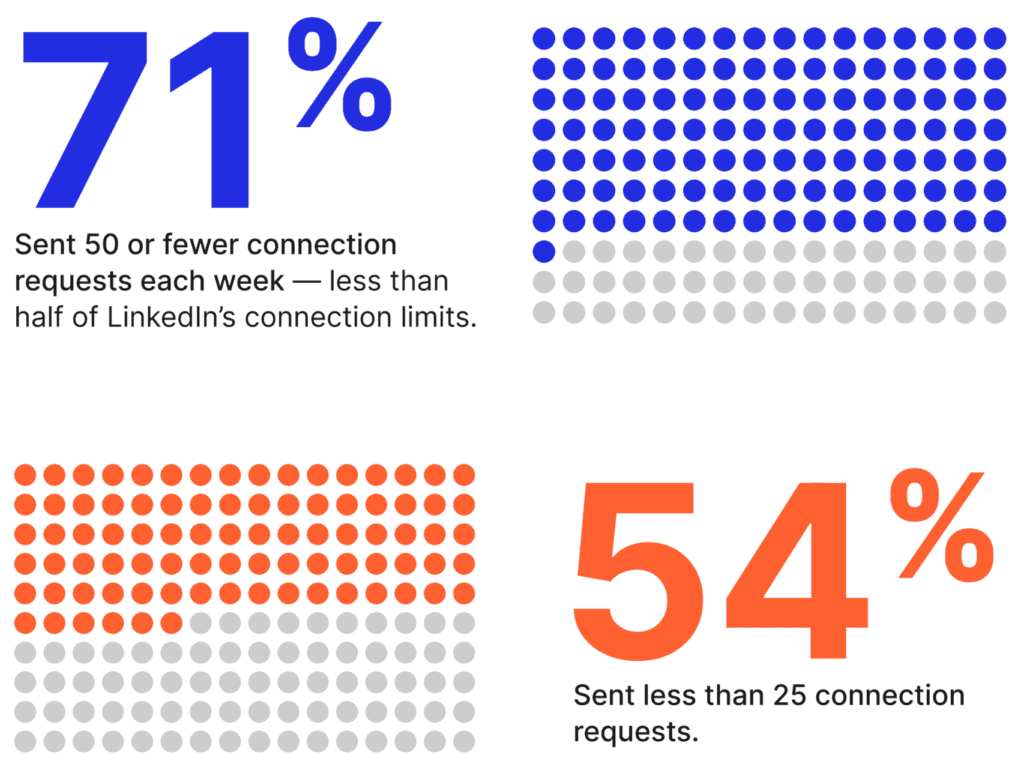
There’s a volume gap to exploit, too. In a survey of 2,200+ sellers from our same report, 54% send fewer than 25 connection requests a week, and 71% send 50 or fewer — less than half of what LinkedIn allows.
The channel is wide open, and automating consistent volume is a straightforward edge.
Three reasons automation earns its place in the stack. LinkedIn message automation:
- Scales personalized outreach past the manual ceiling
You can research and write maybe 30-40 good messages a day by hand.
Automation runs hundreds of personalized sequences in parallel — each lead getting a connection request, a contextual opener, and timed follow-ups — without you touching the keyboard after setup.
Personalized outreach at scale stops being a contradiction as you can now do both (see how below).
- Ensures follow-ups stop slipping
Follow-ups are where deals get made and where manual outreach breaks down; they’re the first thing to drop when your calendar fills up.
A sequence sends them on schedule (day 3, day 7, day 12) and stops the instant a lead replies, so nobody gets chased for a message they already answered.
- Runs while you’re offline
Cloud-based automation sends on your schedule across time zones.
A prospect in another region gets your message at 9 am their time while you’re asleep, and the campaign keeps moving whether or not your laptop is open.
What LinkedIn message automation looks like in practice
LinkedIn message automation is software that sends LinkedIn outreach (connection requests, direct messages, InMails, and follow-ups) automatically, on your behalf, based on rules you set.
You define the audience, write the message templates with personalization variables, set the timing and daily limits, and the tool sends from your account on a schedule.
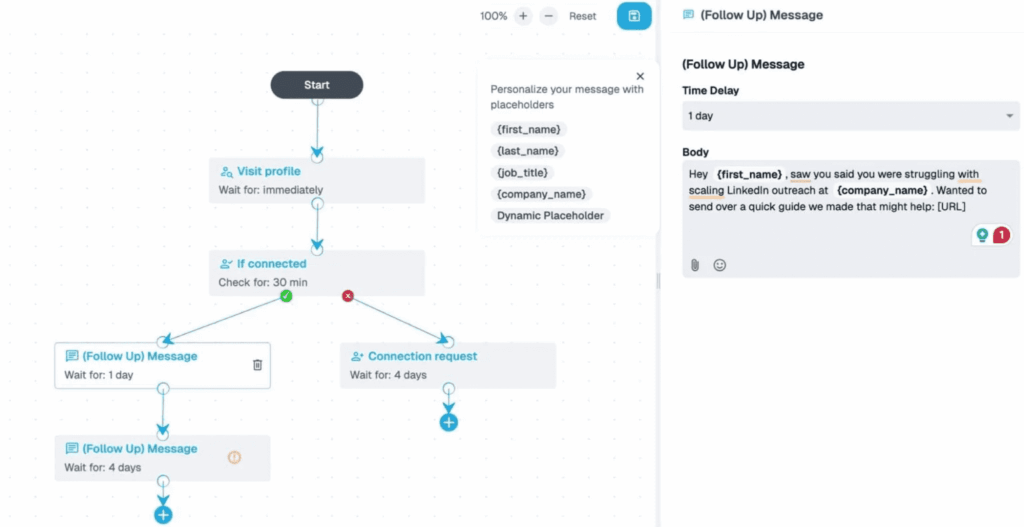
A modern setup does more than fire a single message. It runs a sequence — a branching series of steps that adapts to what each lead does:
- Visit the lead’s profile (a soft touch that often earns a profile view back).
- Send a connection request, with or without a note.
- Once accepted, send a personalized opening message.
- Wait a set number of days, then follow up.
- Branch on behavior — if they reply, stop; if they go quiet, send the next touch; if they view but don’t answer, try a different angle.
That branching is what separates a smart sequence from a basic autoresponder.
Expandi’s Builder runs 19 actions and 11 conditions you can chain into if-then flows: send a message, wait, check whether they replied, send an InMail if not, and so on. You build the logic once, and it runs per lead.
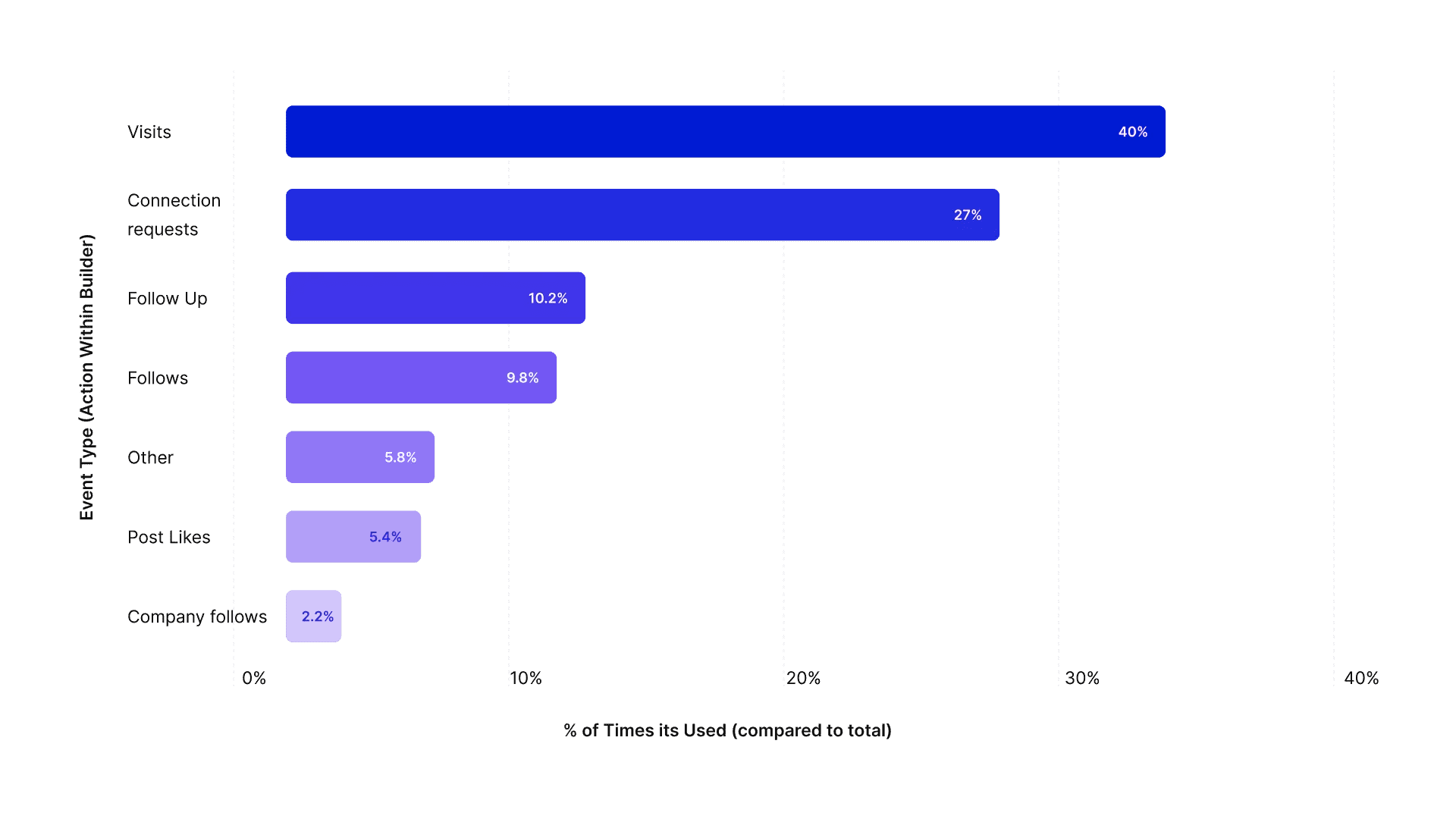
That scale is real: Expandi users have automated more than 29 million actions inside Builder campaigns — the profile views, likes, and follow-ups that warm a lead up before the ask.
Is LinkedIn message automation safe in 2026?
Yes, LinkedIn message automation is safe in 2026 when the tool behaves like a human and you respect LinkedIn’s limits.
It gets risky when it does neither. LinkedIn’s User Agreement does restrict automated access, so the safeguard is tooling that stays human-like and within limits. The single biggest factor is where the software runs.
Cloud-based vs. browser-extension tools
Browser-extension tools run on your computer through Chrome.
They only work while your laptop is on and the tab is open, they often share IP ranges that LinkedIn can fingerprint, and they tend to fire actions in robotic bursts.
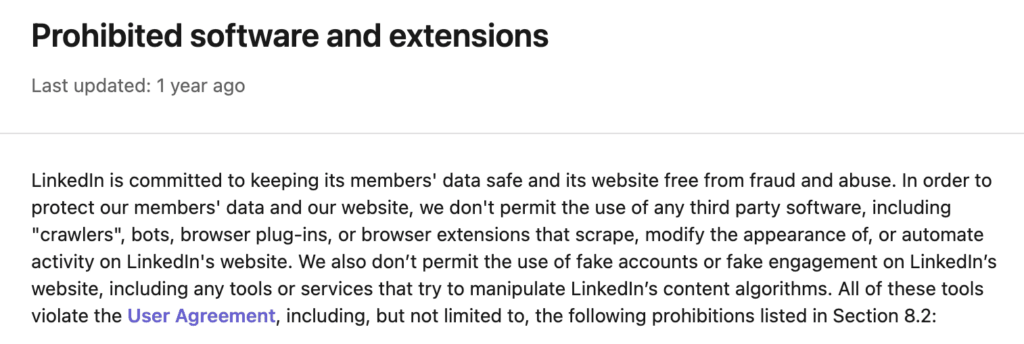
LinkedIn also lists automation extensions among the software it prohibits.
Cloud-based tools like Expandi run on a dedicated server with a dedicated IP tied to your account — a stable, country-specific address that looks like you logging in from your usual location.
Activity runs 24/7 without your machine, and the sending cadence is randomized to mimic human behavior.
Staying inside safety limits with LinkedIn message automation
LinkedIn watches for automated activity and volume spikes. To keep an account healthy:
- Warm up a new account: start around 20 connection requests a day and ramp over two to three weeks.
- Cap connection requests at roughly 100-200 a week.
- Randomize delays between actions, with no instant or identical sends.
- Keep daily message volume reasonable, and stop a sequence the moment someone replies.
- Watch your connection-acceptance rate: Expandi accounts average 29.61%, and a rate well below your usual is a cue to slow down and tighten targeting before LinkedIn does.
- Withdraw stale pending invitations every few weeks: a pile of unanswered requests drags your acceptance rate down and reads as spray-and-pray to LinkedIn.
Volume spikes and robotic patterns are what get accounts restricted, so the safeguard is pacing and using human-like behavior, plus a tool built around account safety rather than raw speed.
LinkedIn message vs. InMail automation
There are two ways to reach someone on LinkedIn: a regular message (which needs a connection) or an InMail (paid, and it reaches people you’re not connected to).
Automating both has a place.
| Attribute | Regular message | InMail |
|---|---|---|
| Requires connection | Yes | No |
| Cost | Free | Paid (Premium / Sales Navigator credits) |
| Best for | Accepted connections, warm 2nd-degree | Hard-to-reach targets, open profiles |
| Reply rate | Higher (warm) | Lower, but opens otherwise-closed doors |
| Automation fit | Connector + Messenger campaigns | Open InMail campaigns |
Lead with a connection request and a free message — warm conversations convert better — and reserve InMail for when the target is senior, hard to reach, or has an open profile you can message without spending a credit.
Expandi automates InMails through Sales Navigator and can run the full InMail workflow as a branch: send an InMail only if a connection request goes unanswered for a week.
How to automate LinkedIn messages: 3 proven campaigns that convert
The campaigns that work in 2026 are warm: they reach people who already have a reason to recognize you.
Three that consistently outperform cold lists.
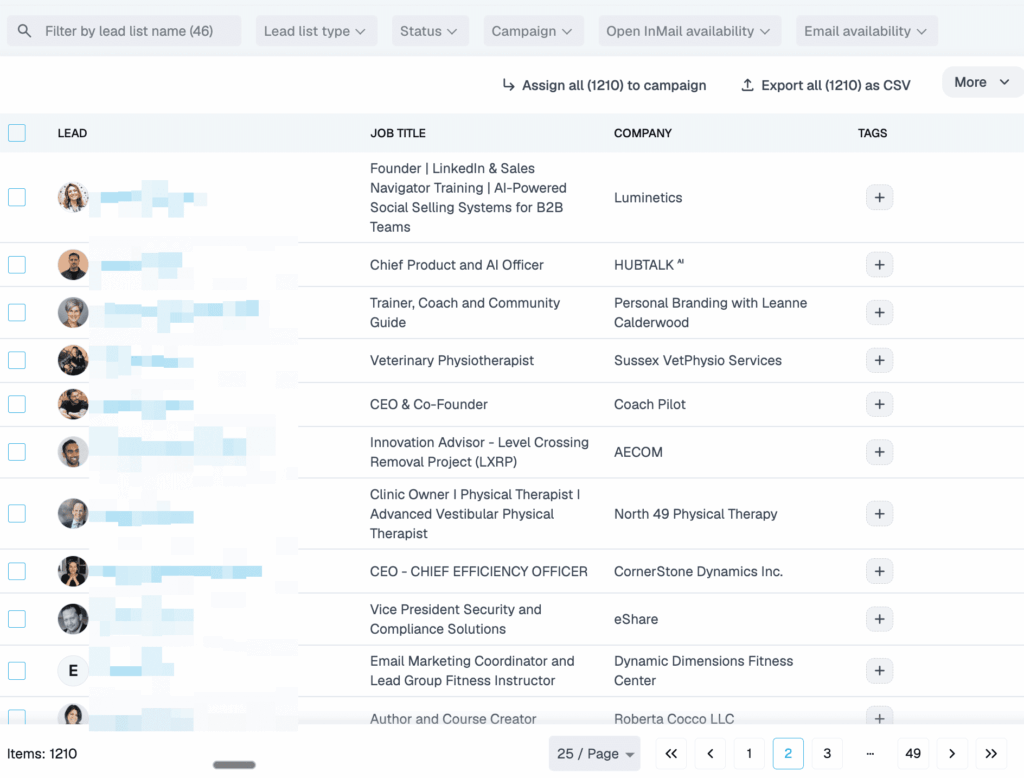
1. Post engagement campaign — message people who engaged with a post
When someone likes or comments on a relevant LinkedIn post (yours, a peer’s, or an industry leader’s), they’ve raised their hand. Expandi’s post engagement feature pulls those engagers into a campaign and messages them with context.
For example, an SDR can point Expandi at a well-engaged post from an industry analyst, pull everyone who commented, and open with a line that references the exact point each prospect reacted to.
- Point Expandi at the post URL.
- It pulls everyone who engaged.
- Send a connection request that references the post, then a contextual opener.
- Follow up on a delay if there’s no reply.
2. Profile visitors — reach people who checked you out
Someone who views your LinkedIn profile is showing a soft signal of interest — they looked you up for a reason.
A profile view is low-intent, but if the viewer fits your ICP, it’s worth a reach-out while you’re still fresh in their mind.
With LinkedIn Premium, Expandi’s Inbound campaign auto-imports the people who viewed your profile and runs a sequence on them, so a profile view becomes an intent signal you can act on while it’s warm.
The opener works because the context is real: you’re messaging someone who just looked you up, with a note tied to their role and company.
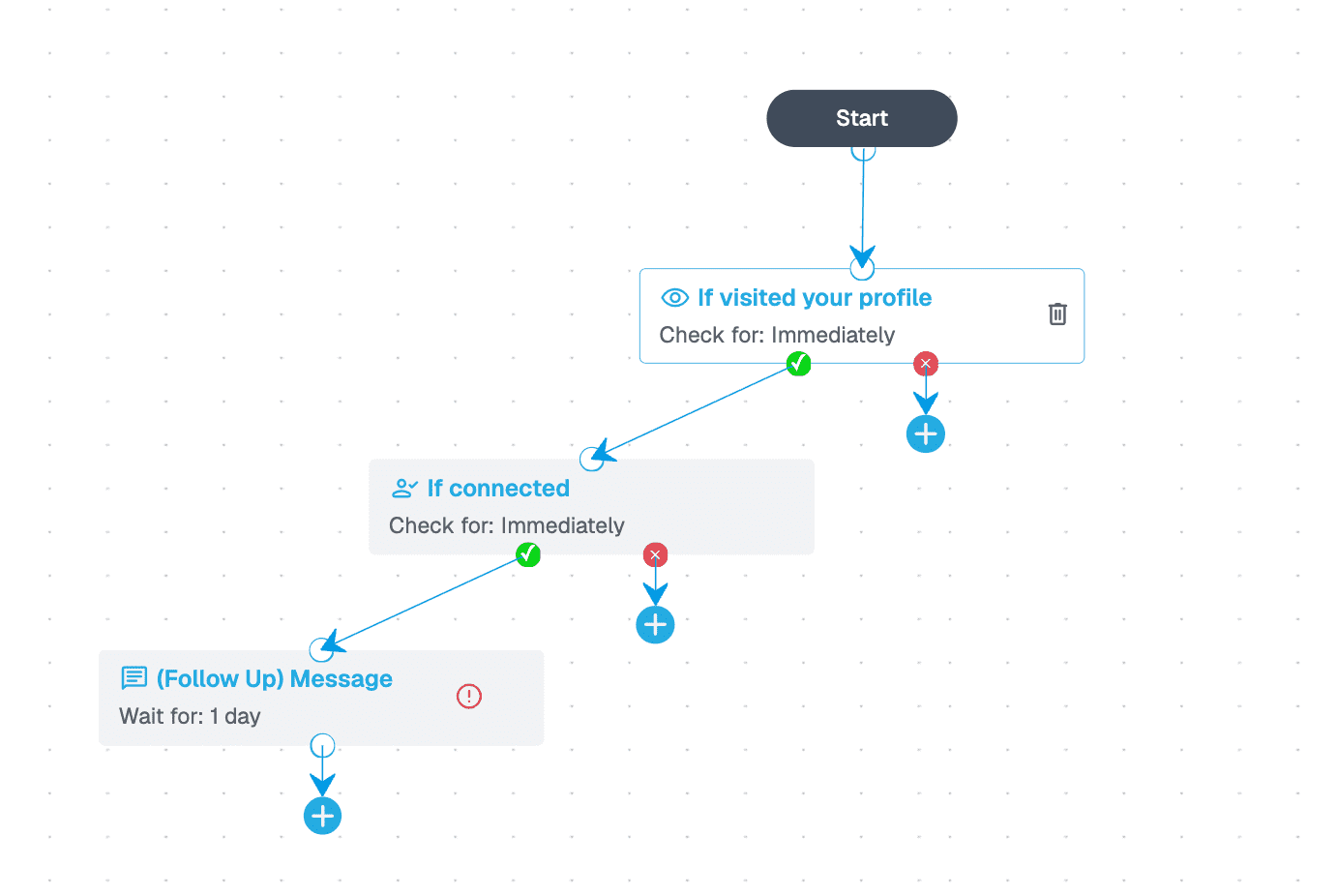
For example, an SDR can let the Inbound campaign pull the week’s profile viewers, focus on the ones who match their ICP — say director-level titles at target accounts — and open with a line tied to their role and company.
3. Sales Navigator sequences — precision targeting at scale
LinkedIn Sales Navigator filters let you build a precise list — title, company size, industry, a recent job change.
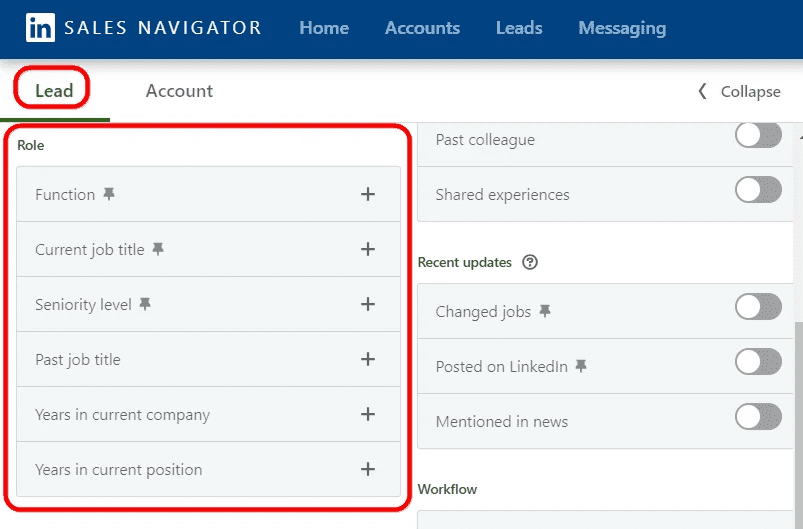
Paste the search URL into Expandi and it pulls the full list into a campaign, then a smart sequence handles profile visit, connection request, personalized message, and follow-up.
For example, a founder selling to mid-market retailers can filter to Head of Growth titles in one region, paste the search URL, and let the sequence work the list overnight.
- Build and run the filtered search in Sales Navigator.
- Copy the search URL into Expandi as a campaign source.
- Expandi pulls the lead list automatically.
- The sequence runs the outreach per lead.
Salescout, a Melbourne-based B2B sales development agency, runs exactly this kind of setup on Expandi’s white-label platform.
Using dedicated IPs with multi-timezone profiles, omnichannel sequences, and hyper-personalized message templates — plus an AI sentiment-recognition integration — they booked 6+ demos and $250,000+ in pipeline in three weeks, at 40%+ response rates on their templates.
“With Expandi, I basically have a team of sales development reps working for me 24/7, 365 days a year. They never sleep and are extremely good at getting the outcomes we seek to achieve, such as engagement bookings for demonstration meetings, among others.” — says founder and CEO Ryan O’Connor. See the full Salescout story.
Message personalization at scale with Expandi’s AI Analyzer
Automation without personalization is spam at scale.
What moves a reply rate is whether each message reads like it was written for one person — the right variables, a line of real context, the right timing.
The strongest messenger campaigns in our data see reply rates as high as 16.86%, and personalization is what separates a message worth answering from a template people scroll past.
Start with the variables
Basic personalization uses placeholders — first name, company, job title — pulled from each lead’s profile. But referencing their company name or job title barely counts as personalization in 2026.
Instead, the reply-rate jump comes from dynamic, contextual lines: referencing a recent post, a job change, or a mutual connection.
“I used Expandi, and I put an automation so that it would go through the whole list of everybody that liked and commented that post. And then I added them on LinkedIn with a message saying, hey, I saw you engage with my case study.” — Nick Tomic, founder of Face2Face, in his GTM Society interview.
There’s a safety payoff too.
Swapping only the first name across one identical template leaves a pattern LinkedIn can read across your whole sending history. Messages that vary in wording and structure from lead to lead keep your outreach looking human at volume.
Let Expandi’s AI Analyzer write and score the messages
Expandi’s AI Analyzer handles personalization inside the platform.
You tell it your audience, your value proposition, and your goal — more leads, more demos — and it recommends sequence steps and generates the copy, openers and follow-ups, matched to that goal — worded differently each time, so one template doesn’t go out a thousand times over.
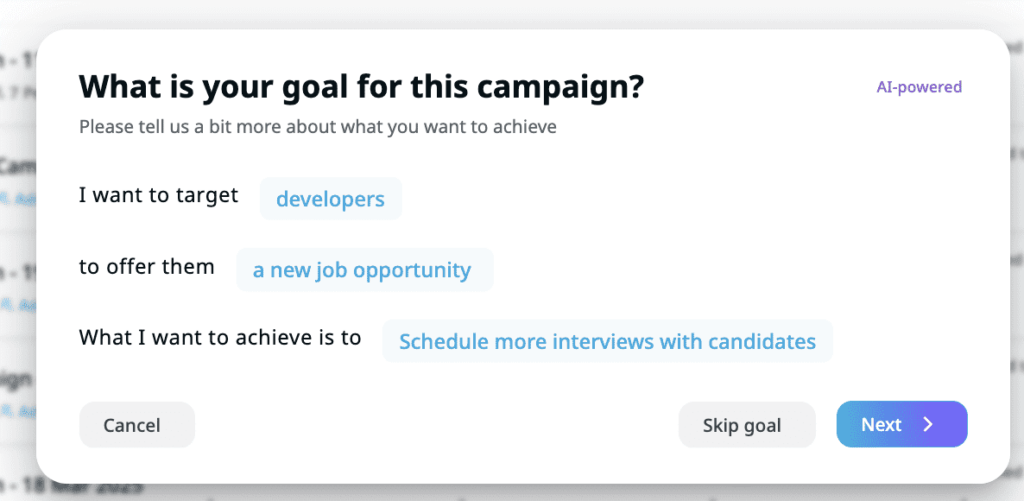
Message generation runs on 15 credits a day, one per message, included in every plan and reset each day. When a lead replies with a question or an objection, it drafts a response right in the conversation window — drawing on a separate pool of 20 credits per campaign — so you’re never starting from a blank reply box.
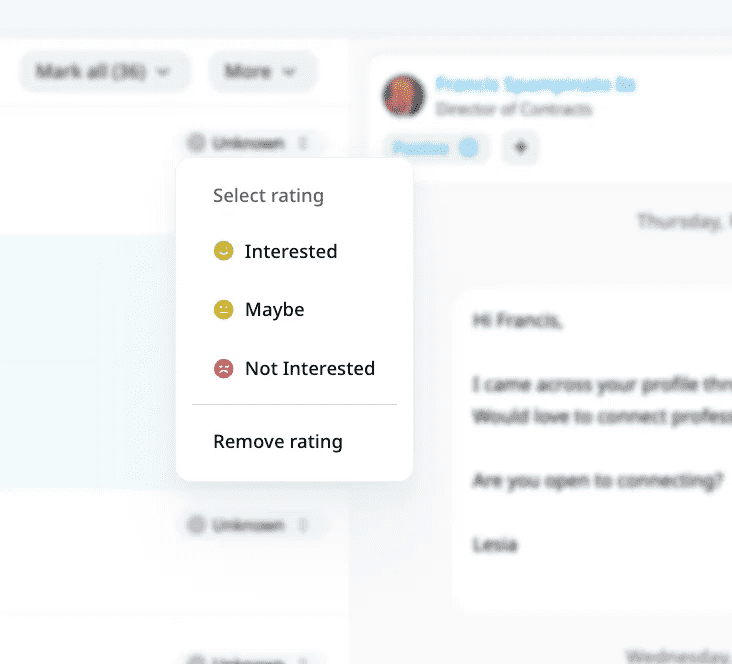
It also reads sentiment. After a lead replies, the AI Analyzer sorts the response into Interested, Maybe Interested, or Not Interested, so you can route hot leads to a human fast and let the sequence keep working the rest. You can override any call it makes.
ChatGPT as the supporting layer
For research and ideation beyond the platform, ChatGPT is a useful second layer: drafting angle variations to test, summarizing a prospect’s recent posts before you write, or generating subject-line options for the email step of an omnichannel sequence.
Use it to feed ideas in, and let the AI Analyzer and your sequence do the sending.
Copy-ready LinkedIn message templates
These map to the warm campaigns above. Templates save time, but in our data they average a lower 8.62% reply rate — the lift comes from personalizing each one per lead.
Treat them as a starting point: swap each bracketed hook for something real about the lead, and let the placeholders in braces ({first_name}, {company}, {job_title}) auto-fill from each profile.
Expandi’s AI Analyzer can also write and vary this kind of copy for you, matched to your goal, so you’ve always got a fresh angle to test. Five you can lift today:
1. Post-engagement connection request
“Hi {first_name} — agree with your take on [the specific point] in [the post]. Connecting so your posts show up in my feed.”
2. Post-engagement opener (after they accept)
“Thanks for connecting, {first_name}. That point you made about [the specific thing] is one we hear constantly from [their role]s — how’s it playing out for your team at {company}?”
3. Profile-visitor opener
“Hi {first_name} — saw you stopped by my profile, so I figured I’d reach out and introduce myself. I work with {job_title}s at companies like {company} on [specific outcome]. Worth a quick exchange?”
4. Sales Navigator opener (after they accept)
“Thanks for connecting, {first_name}. I’ll keep it short: we help [specific role] at [company type] [specific outcome, with a number if you have one]. If [the problem] is on your radar at {company}, I’m happy to share what’s working. If not, no worries.”
5. The no-reply follow-up
“No pressure at all, {first_name} — bumping this once in case it slipped past. If [the outcome] isn’t a priority this quarter, say the word and I’ll close the loop. If it is, I can send a two-line breakdown of how [peer or competitor type] is running it.”
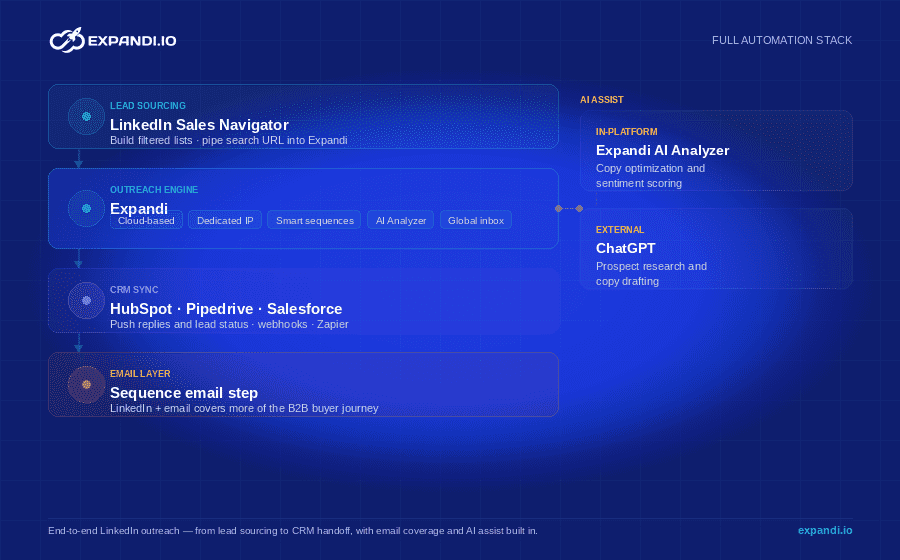
The LinkedIn message automation tool stack
A full automation workflow touches a few tools. Here’s the stack that covers it end to end, built around Expandi:
- Outreach engine — Expandi. Cloud-based, dedicated-IP campaigns, smart sequences, the AI Analyzer, and a global inbox that pools replies across every connected account.
- Lead sourcing — LinkedIn Sales Navigator. Build filtered lists and pipe the search URL straight into Expandi.
- CRM sync — Expandi’s CRM integration (HubSpot, Pipedrive, Salesforce, plus webhooks and Zapier). Push replies and lead status so sales follows up where they already work.
- AI assist — the Expandi AI Analyzer for in-platform copy and sentiment, ChatGPT for outside research.
- Email layer — add an email step to a sequence so you cover the inbox too. B2B buyers now evaluate suppliers across 10-plus channels (up from five in 2016), so pairing LinkedIn with email covers more of that journey from one Expandi flow.
Best practices before you start automating your LinkedIn messages
Automation amplifies whatever you point it at, so the setup around it matters as much as the tool.
Get these right before you switch anything on:
- Optimize your profile first. Automation drives traffic to your profile, so if it doesn’t sell, the outreach wastes itself. Make the headline, banner, and about section about the buyer.
- Warm up new accounts. Ramp volume over two to three weeks rather than jumping from zero to 100 requests overnight.
- Send during business hours. Activity at 3am local time reads as automated, so schedule sends to land inside the lead’s working day.
- Personalize beyond the first name. Reference something real — a post, a role change, a shared group.
- Lead with value. The opener earns the reply; save the pitch for later.
- Test one variable at a time. Change the opener, the message length, or the CTA on its own so you can read what moved the reply rate, then roll the winner out.
- Stop on reply. Every sequence should halt the instant a human responds, so automation never talks over a live conversation.
Turn automated LinkedIn messages into booked meetings
LinkedIn message automation works in 2026 for the same reason it always has — it puts a personalized, well-timed message in front of the right person without burning your day on manual sends.
The accounts winning with it pick a cloud-based tool, respect LinkedIn’s limits, favor warm campaigns over cold lists, and let AI handle the copy and the sentiment sorting.
That’s the setup Expandi runs out of the box: cloud-based, dedicated-IP campaigns, smart sequences, and an AI Analyzer that writes and scores your messages.
Start a free 7-day Expandi trial and launch your first automated campaign this week.
LinkedIn message automation: frequently asked questions
Yes, when the tool runs from a dedicated cloud IP, randomizes its activity to mimic a human, and stays inside LinkedIn’s daily and weekly limits.
The risk comes from volume spikes and robotic patterns, which is why warming up a new account and capping connection requests matter. Browser-extension tools that run on your laptop carry more risk than cloud-based platforms.
LinkedIn looks for signals like activity from unusual IP addresses, identical action timing, and volume spikes. A cloud tool with a dedicated IP and randomized, human-like pacing avoids the patterns LinkedIn flags.
Browser extensions that send in robotic bursts or share IPs are easier to spot, and LinkedIn lists automation extensions among the software it prohibits.
LinkedIn’s User Agreement restricts automated access, and LinkedIn can act on accounts that show automated behavior.
In practice, the market mitigates this with cloud-based tools that use a dedicated IP, respect LinkedIn’s limits, and randomize timing so activity stays human-like. Choosing a tool built around account safety is the main safeguard.
For a new or newly automated account, around 20 connection requests a day is a safe starting point, scaling toward LinkedIn’s weekly ceiling of roughly 100-200 over two to three weeks.
Messaging existing connections has more headroom, but randomized pacing still matters. Start low and ramp.
The automation tools themselves are paid, but you don’t need LinkedIn Premium to run them — Expandi works with a free LinkedIn account and pulls leads from standard search.
Sales Navigator adds sharper targeting but isn’t required. Expandi offers a 7-day free trial so you can test a full campaign before paying.
Yes. Omnichannel sequences let you add an email step alongside LinkedIn touches, so a lead who ignores a connection request might answer an email, all from one automated flow. That extra step covers ground LinkedIn alone misses.
Expandi runs LinkedIn and email steps in the same smart sequence.




You’ve made it all the way down here, take the final step