How to Write a Sample Email to Approach New Clients (+ 6 Templates)

Key Takeaways
A sample email to approach a new client is a short, personalized message that introduces you, states one clear value proposition, and ends with a low-friction call to action, usually a short call or a reply.
The strongest versions open with a specific, researched detail about the recipient rather than a generic greeting, keep the pitch to one paragraph, and offer a single next step instead of several.
What makes a good outreach email to approach a new client?


You’ve found your prospects and you understand how to approach them, but turning that into words that actually land is the hard part.
Below are six sample emails to approach new clients, a line-by-line breakdown of what makes one work, the prep that happens before you write, and the best practices that lift reply rates.
Here’s what this guide covers:
- Six sample email templates to approach new clients
- A breakdown of what makes a strong approach email work
- What to research before you write
- Best practices for reply rates and deliverability
What’s an introduction email to approach new clients online?
A business introduction email, sometimes called a welcome email, is the first message you send a potential client to open a relationship and, eventually, sell your product or service. It could also be an email suggesting a collaboration with a business, brand or influencer. It explains who you are, states the value you offer, and includes one clear call to action, such as a brief call or a reply.
The goal is to start a conversation that could lead to a working relationship. If it’s your first contact, the recipient doesn’t know you yet, so reference any prior touchpoint, like a comment they left, a post they shared, an event you both attended, and lead with the value you’re offering rather than your credentials.
Six sample email templates to approach new clients
Each template below is customer-focused and built to earn a reply, not to get deleted on sight. Adjust the specifics to your audience, a template that worked for one company won’t automatically work for yours.
1. Personalized cold email
This structure runs on four parts: a personalized first line, a relevant value proposal, a short piece of social proof, and a single call to action.
Subject line: Quick question on [company’s pain point, e.g., reducing customer churn by 40%]
Hey {first_name},
Reaching out because I saw {personalization, e.g., that you shared Mike Brian’s LinkedIn post on customer retention}.
We help [specific role, e.g., customer success leads] at [company type, e.g., B2B SaaS companies] [specific outcome, e.g., cut churn by 30% without adding headcount].
We recently helped [similar company] increase retention by [quantifiable outcome, e.g., 30% in 8 weeks] using [named approach, e.g., an automated engagement system].
Want to see the actual process and whether it maps to your setup?
[Your name]
Why it works:
- The subject line names a specific pain point and teases the solution inside.
- Referencing a company similar to theirs makes the claim relatable and credible.
- The CTA points to one clear next step.
2. Omnichannel dynamic GIF email
This one pairs best with an omnichannel sequence: LinkedIn, email, and calls working together. It’s a natural follow-up after a prospect accepts your LinkedIn connection request.
Subject line: Thanks for connecting, {first_name}
Hey {first_name}!
Quick note to say thanks for connecting on LinkedIn.
Using dynamic GIFs like the one below, we’ve helped clients lift reply rates as high as 55%.
If I can help in any way, I’m happy to jump on a quick call. 🙂
Adding a personalized GIF to every email can be automated, so you’re not editing images or rewriting from scratch each time. Here’s the setup:
- Upload a custom GIF to Hyperise.
- Set the size (usually 600×600 px) and add dynamic fields: first name, company name, logo, or a website screenshot.
- Integrate it into Expandi by pasting the API code, then click Sync from Hyperise in the campaign, below your body message.
A common campaign flow:
- Send the LinkedIn connection request.
- On acceptance, check whether the profile has a findable email.
- If an email is found, send the email automatically after a set delay.
3. Congratulate them on a specific outcome
People respond well to recognition. This email ties your email outreach to something the prospect recently achieved: a funding round, a product launch, an award.
Find these triggers through VC deal sites or intent data platforms like Common Room, Trigify, and LinkedIn Sales Navigator, or business journals like TechCrunch and Bloomberg.
Subject line: Congrats on the raise, {first_name}
Hey {first_name}!
Saw your fundraising announcement, congrats on the {number} milestone.
At this stage, scaling outbound efficiently is usually what keeps CAC under control.
I recently helped [similar company 1] and [similar company 2] [quantifiable result, e.g., increase reply rate by 40%] through omnichannel outreach across email, LinkedIn, and calls.
I’ve got a few ideas on hitting your post-fundraising sales targets faster. Open to a quick call?
Cheers, [Your name]
Why it works:
- The timing is tied to a real event, so it reads as intentional rather than random.
- The social proof names comparable companies and a concrete result.
- The CTA is light and easy to say yes to.
4. Post-webinar message to a warmer audience
If you run webinars, this is a strong way to approach attendees while the session is still fresh. It works best when you already have an engaged audience.
Subject line: Keep the LinkedIn momentum going
Hi {first_name}!
When I saw you from {company_name} attended our webinar on preparing, marketing, and launching LinkedIn events, I figured you’re serious about your reach on LinkedIn.
One theme came up again and again from attendees: how to hold visibility after the event ends.
So I wanted to personally invite you to our private community: marketers and sales operators trading outreach playbooks and LinkedIn feature updates before they go public.
Join here: [insert link]. Drop by and say hi.
Cheers, [Your name]
Why it works:
- The subject line connects to the webinar theme and sparks curiosity.
- It references a real struggle attendees raised and positions the community as the answer.
- The CTA is a single, low-commitment action.
5. Custom video audit email
Here you send a short, personalized video walking through a few specific ideas for the prospect’s business. The value is in the effort; it proves the outreach isn’t a one-size-fits-all blast.
Subject line: Ideas to boost {company_name}’s LinkedIn ads conversion
Hey {first_name},
I got retargeted by your LinkedIn ads — the copy was sharp. It hits agency-owner pain points well.
I’ve worked in B2B ads for a few years, and conversion almost always has room to grow through proper A/B testing. For context, I’ve worked with brands like [Company A] and [Company B], [result, e.g., doubling clickthrough rates] using [approach, e.g., A/B testing and ad-angle retesting].
I recorded a 2-minute video with three ideas for your setup: [URL].
If any of them click, I’d be glad to jump on a 5-minute call. What about next Wednesday or Thursday?
[Your name]
Why it works:
- The subject line states the value the prospect gets.
- The named results add credibility.
- The personalized video proves the email isn’t generic.
6. The expert opinion email
Instead of offering help, you ask for it. Requesting a prospect’s expert input is a genuine way to stand out in a crowded inbox and open a two-way relationship.
Subject line: {first_name}, would value your take on {topic}
Hi {first_name},
I came across your article “[article_name]” on [website_name] while researching this exact topic.
We’re working on [project] and I’d value your perspective on [topic]. I think your input would sharpen how we approach it.
Would you be open to a short call next week? I’ll send you a copy once it’s published.
Cheers, [Your name]
Why it works:
- The subject line offers the prospect visibility.
- The value exchange is clear: they gain exposure by contributing.
- The CTA prompts a simple yes or no.
Sample email breakdown: what makes one work
Here’s a complete example, followed by the specific things it gets right.
Subject line: Quick question, Stefan
Hey Stefan,
Saw your webinar with Ian Naylor on hyper-personalized GIFs in LinkedIn outreach. Great job on the 55% reply rate.
Speaking of outreach, my team’s been building a sales tool that writes unique, AI-generated first lines for outreach emails. What makes it different: it pulls from the prospect’s Twitter, blog, and other social profiles to find something relatable, not just their LinkedIn.
Happy to send 50 free credits if you want to try it. Or a quick 5-minute call this Thursday or Friday if you’re game?
We’re focused on getting the word out right now, so I’d genuinely value your feedback.
What do you think?
PS Yes, this first line was written by our own tool. We eat our own dog food. 🙂
What makes it work:
- It’s specifically personalized. It names the recipient and a real result they achieved (the 55% reply rate), not a generic opener.
- The transition to the pitch is relevant. The webinar topic signals interest in outreach, so the product mention lands in context.
- The CTA gives two easy options. A no-cost trial or a short, time-boxed call.
- The final line stays open. It invites a reply rather than forcing a decision.
Pro tip: Don’t just swap the placeholders and call it done. Tailor the message to each client’s situation. Every business and industry is different, and there’s no guaranteed template. What lands depends on the prospect’s needs, their preferences, and the strength of your offer.
How to write an email to approach new clients
Most sales emails share the same building blocks. Keep these five in mind next time you write one.
1. A strong, personalized subject line
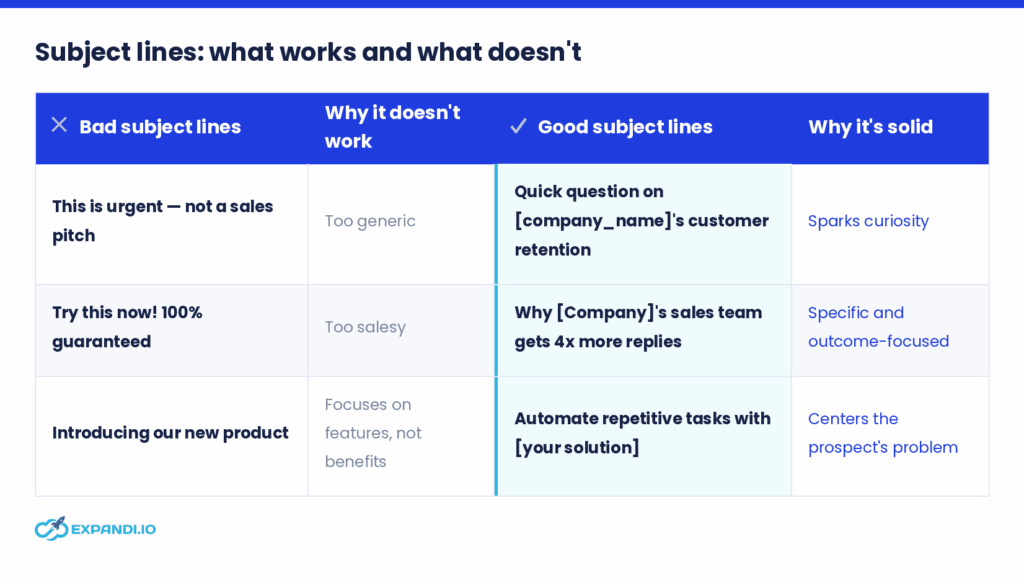
Write a subject line that taps the recipient’s curiosity or names a specific pain point. Keep it brief, relevant, and specific; under 10 seconds to read. Avoid anything sensational or clickbait: if the subject line doesn’t match the email, the reader clicks away, and misleading a new client is a poor way to open a relationship.
2. Start with a strong hook
The first lines decide whether the rest gets read. Lead with something that earns attention: a personalized observation, a direct question, or a bit of humor.
For example: “Saw your webinar with Ian Naylor on hyper-personalized GIFs in LinkedIn outreach — great job on the 55% reply rate.”
3. Introduce yourself
After the hook, get to the point. The reader’s real question is “what’s in it for me?”, so keep your introduction to a line or two. For example: “I’m [name], reaching out because…”
4. Make a relevant pitch
Curate your value proposition to each prospect’s specific problem. Instead of “our product automates lead qualification faster,” write “our product automates lead qualification, cutting response time by up to 70%.” Back it with proof where you can: a case study, a demo video, a customer testimonial, or a success metric.
5. End with a clear CTA
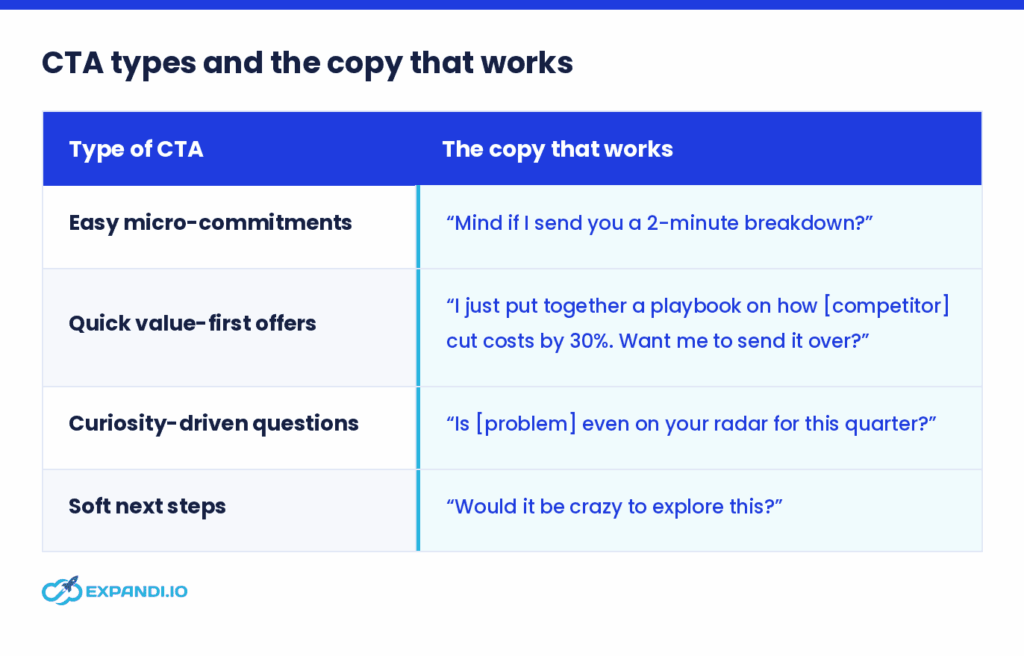
An email without a call to action leaves the reader guessing. Use action-oriented, specific language, keep it short, and follow a natural progression. Rather than asking for time outright, offer something that makes replying easy.
Read our guide to writing effective email CTAs.
What to do before writing a sample email to approach new clients
The best approach emails aren’t written in a rush. The real work happens before you type a word.
1. Understand your prospect’s pain points
If you had to state your prospect’s problem in one sentence, what would it be? Three questions get you there:
- Who is my audience? (e.g., CEOs, CMOs, Heads of Sales)
- Why do they need my service? (e.g., they’re losing 15+ hours a week to manual lead gen)
- What can I offer them? (e.g., an automated workflow that frees that time for strategic work)
2. Segment your client list
Once you know why prospects need you, group them by meaningful differences so you can personalize at scale. Collect and review their information from social media, databases, or public directories; define segmentation criteria (demographic, psychographic, geographic); and test whether those segments reflect real behavior.
3. Verify their email addresses
An unverified list wastes effort and hurts deliverability. Check for catch-all addresses, duplicates, typos, and dead inboxes before you send, so your emails reach the inbox rather than the spam folder.
Best practices for approaching new clients by email
Templates handle the words. These seven practices handle everything around them: timing, targeting, follow-up, and deliverability. And that’s usually where reply rates are won or lost.
1. Build rapport before outreach
People trust a familiar name over a cold one. Engage a few times before your first email (comment on their content, ask a genuine question, reference a shared interest), so your name isn’t brand new when you reach out. Good places to build rapport: social media, online content, in-person events, and asking for advice.
2. Use automation to personalize at scale
You don’t have to research, write, and send every email by hand.
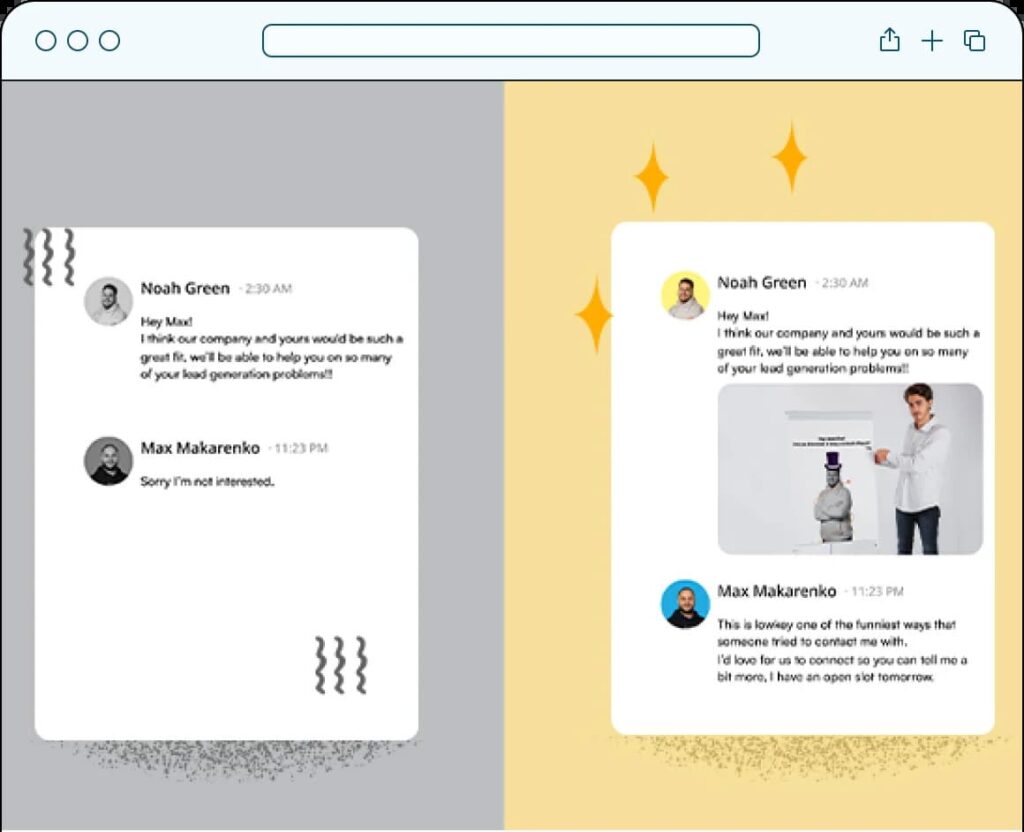
With Expandi, you can build hyper-personalized messages that do more than drop in a first name: dynamic fields, images, and GIFs, A/B test variants, and set message limits to protect your sender reputation.
3. A/B test your subject lines
Split testing compares two versions of an email to see which resonates. Test one variable at a time: subject line, hook, tone, pitch angle, or CTA. This way, you’ll know what caused the change, and measure open, reply, bounce, and clickthrough rates to judge the result.
4. Send follow-up emails
Follow-ups are one of the simplest ways to lift replies, but flooding an inbox backfires. A workable cadence is three follow-ups, each carrying a distinct value:
- Follow-up 1: Reference a specific pain point they raised.
- Follow-up 2: Share a customer story that solves that exact issue.
- Follow-up 3: Tie your solution to an upcoming opportunity, like a quarter-end goal.
5. Improve deliverability
Your emails belong in the inbox, not spam. Set up the basics:
- Check your IP and domain reputation.
- Configure SPF, DKIM, and DMARC authentication.
- Warm up your domain, starting at a low daily volume.
- Set sending limits to avoid blacklisting.
- Personalize messages and skip spam-trigger words.
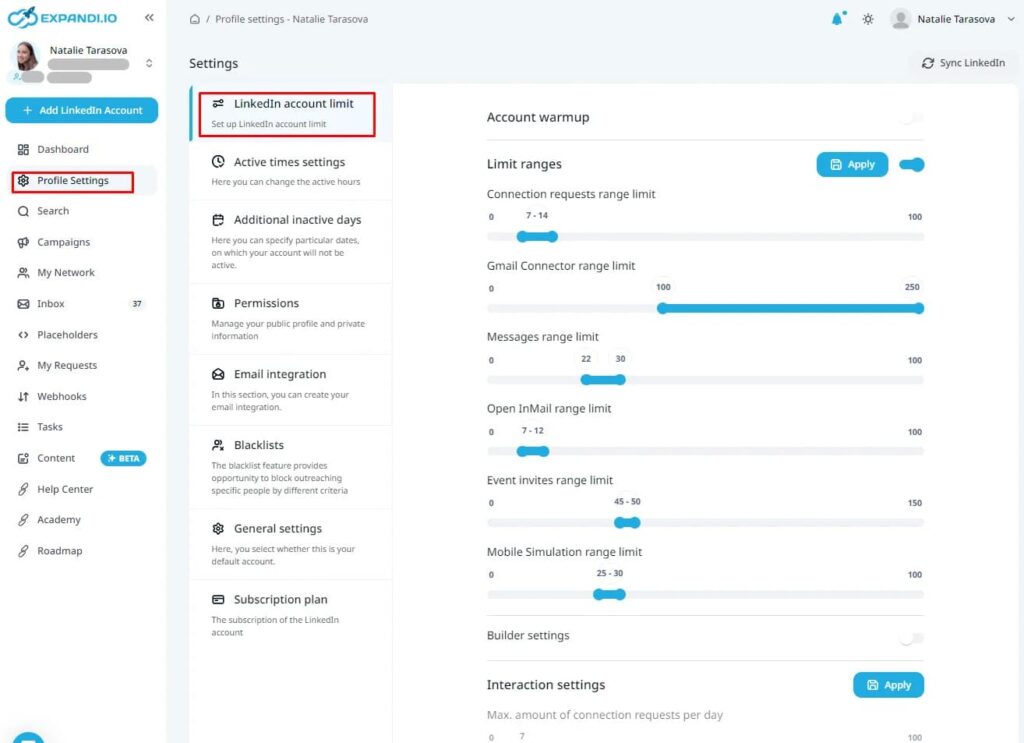
The same logic applies to LinkedIn: warm up a new account with a low connection volume before scaling up, so you protect it from restrictions.
6. Don’t rely on one channel
A single email is easy to miss. A LinkedIn connection request, an email follow-up, then an InMail or a DM makes you far harder to overlook, but running that by hand across dozens of prospects falls apart fast.
This is where Expandi’s Builder Campaign comes in: a visual, block-based workflow where you stack conditions and actions into automatic “if-then” sequences that adapt to each lead’s behavior, no coding required.
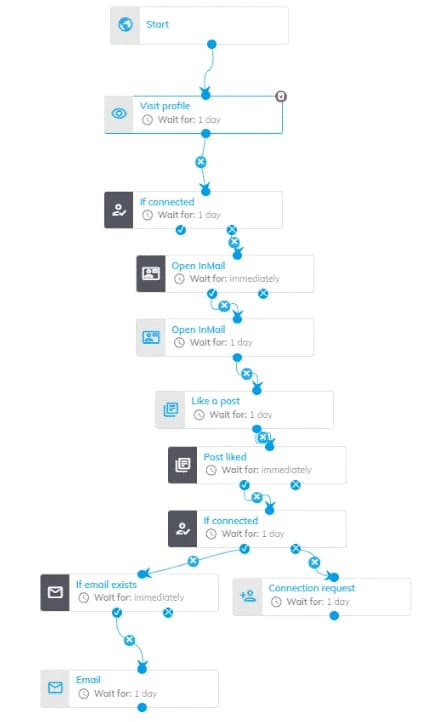
If a prospect accepts your connection but doesn’t reply within a few days, the sequence can trigger an email; if they open that email, it can route them to an InMail or a follow-up message instead. You build the logic once from a set of conditions: if connected, if email opened, if message replied, if they viewed your profile or liked a post, and the campaign runs each prospect down the path their actions dictate.
This is also where signal-based outreach stops being a tactic and becomes a system: profile views, post engagement, and other social signals become the triggers that decide who gets messaged and when, so your outreach responds to real behavior rather than firing on a fixed schedule.
This is signal-based outreach in practice: a real event becomes the trigger for a timely, relevant message. In Expandi, you can build campaigns that fire off these triggers automatically rather than hunting for them by hand.
7. Include an opt-out option
Make it easy to unsubscribe. Without a clear opt-out, frustrated recipients mark you as spam, which damages your sender reputation over time. An opt-out also keeps you compliant with regulations like the CAN-SPAM Act and GDPR.
Put these templates to work
You now have the templates, the structure, and the best practices to write an email that actually earns a reply. Keep the focus on the prospect, and tailor every message to fit.
If LinkedIn is part of your outreach mix, our LinkedIn automation tool can run the same kind of first-touch sequence automatically.
Expandi lets you build personalized LinkedIn and email campaigns and automate the sending in one workflow. Start your 7-day free trial today.
Frequently asked questions
Structure the email around the reader. Open with a specific, relevant subject line, keep the body short and value-driven so it’s clear you’re solving a real problem, and close with one clear call to action that makes replying easy.
Focus on the client, not yourself. Lead with their pain point or goal, show how your product or service addresses it, and include relevant social proof, like a case study or a comparable result, to build credibility. End with a single, low-friction next step.
Mid-morning on weekdays (roughly Tuesday through Thursday) tends to catch professionals as they work through their inbox, and testing send times against your own audience is the only reliable way to confirm what works for your list. The best time is ultimately the one your reply-rate data points to, so treat any general window as a starting hypothesis to A/B test.
Research the prospect first, personalize the opening line with something specific to them, state one clear value proposition tied to their problem, and offer a single next step. Pair it with an omnichannel touch to raise the odds they notice you.
Confirm the relationship warmly, set expectations for what happens next, and point them to one clear resource or action. Keep it short and make the reader feel they made a good decision.
Keep it to a line or two. State who you are and why you’re reaching out, framed around what’s in it for them, then move quickly to the value you offer rather than your background.


You’ve made it all the way down here, take the final step