How to Build an Email List for Marketing (B2B, 2026)


Your buyers may never see the pop-up on your homepage, but they may have liked your LinkedIn post this morning. This interaction gives you a timely reason to offer a useful resource. If they want to receive your emails afterward, they can subscribe through a clearly worded form.
This guide explains how to grow an email list in the places where B2B buyers already pay attention, starting with LinkedIn engagement.
Quick answer: An email marketing list contains people who chose to receive your emails. In B2B, LinkedIn engagement can reveal who is interested in the topic. Send those people to your own opt-in form, then record the source and consent details in your CRM. Keep purchased data out of the marketing list.
What is an email list for marketing?
An email list for marketing is a collection of people who chose to receive specific emails from your company and can unsubscribe at any time.
This choice separates a marketing list from a B2B prospecting list. Both may contain business email addresses, but they serve different purposes and require separate records.
| Question | Marketing list | Prospecting list |
|---|---|---|
| How contacts get on it | They complete a signup form or another explicit subscription process. | They’re sourced lawfully from professional data, referrals, research, or public business information. |
| What they agreed to | The emails described on the form, at the stated frequency. | They haven’t subscribed to marketing email. Any outreach must follow the rules that apply to the recipient and market. |
| Who sends | The company’s marketing program through an approved email service. | A salesperson or founder starting a relevant business conversation. |
| What goes out | Newsletters, reports, product updates, and event invitations. | Direct outreach written for the recipient’s role or company context. |
Keep one contact record in the CRM, with separate fields for subscription status, sales activity, source, consent history, and suppression. A prospect can later become a subscriber, but the record should show when and how that happened.
Why B2B teams struggle to build an email list for marketing
Most advice on email list building assumes an ecommerce audience. And though a discount may persuade a shopper to subscribe, a VP of Sales is more likely to want a benchmark they can use or a working template.
Website forms only work when the right buyer visits at the right time. LinkedIn adds context because the person has already indicated interest in the subject.
To illustrate, Litmus’ 2025 State of Email survey found that 35% of marketing professionals reported returns of $10 to $36 for every $1 spent on email. Another 30% reported $36 to $50. The survey covered nearly 500 professionals, and 21% said they didn’t measure email ROI.
LinkedIn can supply the opening for that invitation. Across more than 70,000 campaigns in Expandi’s data, LinkedIn DMs averaged a 10.3% reply rate, compared with 5.1% for cold email. These figures measure outbound replies, so use them only to understand where a B2B conversation may begin. They don’t predict subscription rates.
This advantage disappears if the permission step is skipped. Purchased lists can contain stale addresses, prior opt-outs, or data gathered through prohibited methods. US law doesn’t generally require prior consent for commercial email, but the FTC’s CAN-SPAM requirements still apply.
How to build an email list for marketing in 7 steps
Building a B2B email list starts with a defined audience and a clear promise. The 7 steps below show how to turn LinkedIn interest into a documented signup.
1. Decide who the list is for and what they get
Start by deciding who should subscribe and what they’ll receive. Name the role and company type, then write down the problem that the email will help with.
For example, a list for heads of sales at B2B SaaS companies could promise one annotated LinkedIn outreach benchmark each month.
Keep that audience consistent across the LinkedIn post and signup page. If the post speaks to heads of sales, the email promise should speak to them too.
2. Create one lead magnet worth signing up for
Choose an asset that solves a specific problem. B2B buyers are more likely to value original benchmarks, working templates, scorecards, and calculators they can use in a meeting or decision.
The State of LinkedIn Outreach H2 2026 shows the principle in practice, as it provides original data that a sales leader can use in a QBR, so the signup page makes a concrete promise.
Before building the full campaign, publish one finding from the asset. The questions and comments it attracts will tell you whether the premise is clear enough for the signup page.
3. Put opt-ins where your buyers already are
Give every channel a clear route to the same signup page. Keep the subscription promise and consent record consistent.
| Source | How to use it | Best fit |
|---|---|---|
| Dedicated landing page | Explain one resource and one email promise. Remove unrelated navigation where possible. | Search, partner referrals, and direct traffic. |
| LinkedIn post | Share part of the idea in public, then invite interested readers to request the complete resource. | Comment-to-get resources and benchmark reports. |
| LinkedIn newsletter | Link to a related asset and explain what the email subscriber receives beyond the platform edition. | Readers who already follow your thinking on LinkedIn. |
| Webinar | Offer slides, a worksheet, or follow-up analysis through a clearly disclosed signup form. | Topics that benefit from explanation or live questions. |
| LinkedIn event | Send registrants or attendees to a separate opt-in page. Event registration alone doesn’t create newsletter consent. | Event recaps, research, and role-specific resources. |
4. Turn LinkedIn engagement into subscribers
A comment on a resource post gives you a natural reason to follow up. If the commenter wants ongoing emails, the next step is your opt-in form.
A comment-to-get workflow in Expandi can run like this:
- Publish a post that offers a specific resource in exchange for a keyword comment.
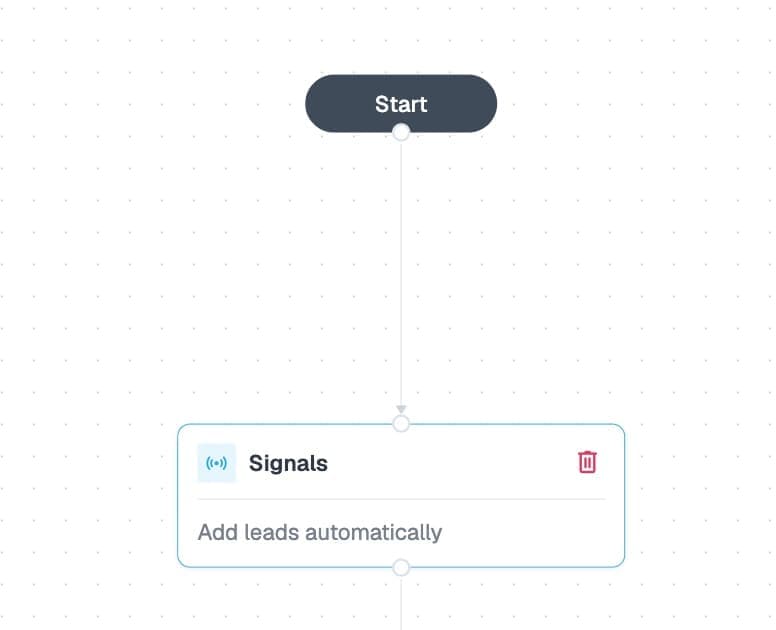
2. Add a Signals action as the first step of a Builder campaign and choose Post engagement.
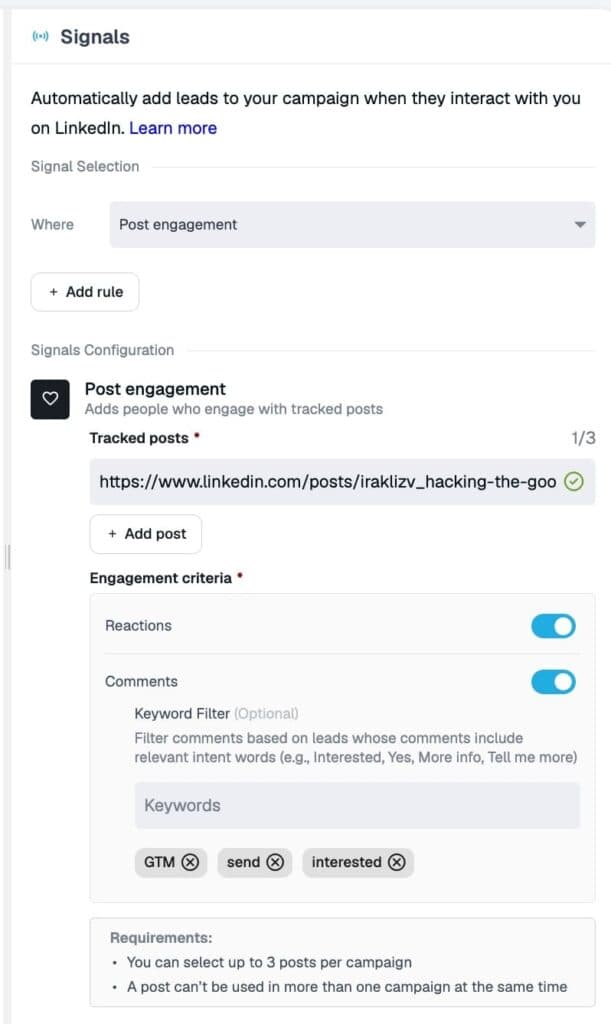
3. Paste up to 3 post URLs, choose commenters, and apply the keyword filter when the post asks for a specific word.
4. Add an ICP Filter condition if the follow-up should reach only the audience the resource was built for.
5. Send a connection request or message within the account’s warm-up settings and daily limits.
6. Deliver a link to your own opt-in page. Add the person to the marketing list only after the form records the subscription.
Permission checkpoint: A LinkedIn comment or event registration gives you a reason to follow up. It does not place the person on your email marketing list. Subscription begins when they complete the form.
Expandi’s Signals guide documents the 3-post limit and keyword filter. Signals can turn relevant post engagement into a lead source, and replies to the resulting outreach appear in the Global Inbox.
Event campaigns use the same principle: the event creates the context, and the form records the subscription. Historical Expandi data found a 14.21% LinkedIn reply rate for Event Participant campaigns, but it didn’t measure email opt-ins. That campaign type is no longer available.
Under the current setup, Event Pods coordinate invitations across contributors’ first-degree networks. After the event, interested people can be invited to a separate signup form with its own marketing disclosure.
5. Use double opt-in and say what is coming
Double opt-in asks the subscriber to confirm the address before regular marketing emails begin. It can catch mistyped addresses and gives you a record that the confirmation was completed.
If you rely on consent as your lawful basis (the term used in GDPR guidance), keep the request specific and easy to understand. The European Commission describes valid consent as freely given, informed, specific, and expressed through a clear affirmative action. Electronic marketing rules vary by recipient and jurisdiction.
Tell people what they’ll receive and how often. Repeat that promise on the confirmation page and in the welcome email. A short email drip campaign can deliver the resource, explain how to use it, answer a common question, and remind the subscriber what will arrive next.
6. Verify and clean before your first send
Validity’s 2025 CRM data study surveyed 602 CRM users and stakeholders. Of those respondents, 76% said less than half of their organization’s CRM data was accurate and complete. The study covers CRM records as a whole, but it also shows why list hygiene can’t end at the form.
Before the first campaign, remove duplicate records, suppress previous opt-outs, check questionable addresses, correct malformed fields, and record the source of every subscription. A quarterly review prevents stale records from surfacing during a major send.
Once sending begins, monitor hard bounces, complaints, unsubscribes, clicks, and downstream conversions. Open data can be distorted by privacy features and automated image loading. Teams that also run prospecting campaigns should keep their cold email practices and warm-up process separate from the marketing program.
7. Tag every subscriber by source and sync the record to your CRM
Source tags show how the subscription began. Use specific values such as LinkedIn post, LinkedIn event, webinar, organic search, and partner referral.
Store the subscription status, source, timestamp, wording shown on the form, and suppression status on the contact record. This gives sales the context behind the record before anyone starts a conversation.
CRM rule: Keep one contact record, but store sales outreach and marketing subscription as separate statuses. A prospect can become a subscriber later, and the record should show when that happened.
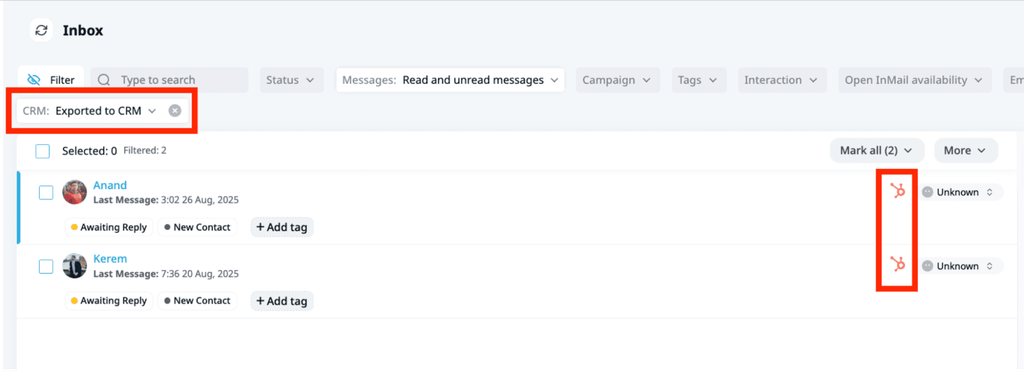
Expandi’s CRM integrations can send LinkedIn-sourced contacts and outreach activity to supported CRMs such as HubSpot and Salesforce. Pipedrive is available, too. The form or email platform should create the marketing-subscription record. Confirm the available field mappings before describing the entire process as automatic.
Worked example: turning a LinkedIn post into subscribers
A B2B company publishing a benchmark report for sales leaders could share one chart on LinkedIn and ask readers to comment “REPORT” for the full analysis.
The Signals feature identifies people who used the keyword, and an ICP Filter narrows the follow-up to the audience the report serves. The LinkedIn message acknowledges the comment and sends the reader to a landing page that explains the email program.
If the person completes the form, the marketing platform creates the subscription record and the CRM records “LinkedIn post” as the source. A reply to the LinkedIn message remains a sales conversation. Newsletter permission begins only when the person completes the form.
Measure the journey from post to subscriber: relevant comments, landing-page visits, completed opt-ins, confirmed subscriptions, and qualified sales conversations. This keeps content engagement separate from list growth and pipeline.
Email list building mistakes that cost you subscribers
These mistakes usually come from treating attention as permission. Fixing them protects the relationship with subscribers and keeps your records usable.
Buying a list and calling it “opted in”
A purchased address carries no record of agreement through your form. Besides, the list can contain old data, prior opt-outs, spam traps, or addresses gathered through prohibited methods. Build the marketing list through your own permission process.
Adding LinkedIn connections without asking
A connection acceptance opens a LinkedIn conversation. If the person wants your emails, invite them to a form that explains the program. Never copy the address into a newsletter platform.
Gating every useful idea
Give readers enough value to judge the quality of your work before asking for an address. Keep the central insight public, and reserve the form for a resource with enough depth to justify the signup.
Letting the list go quiet
After months of silence, subscribers may forget why they joined. Reintroduce the list by reminding them where they signed up and what they’ll receive. Include an easy unsubscribe option. Remove anyone who opts out from active sends, but keep them on the suppression list so they can’t be added again by mistake.
FAQs about building an email list for marketing
Never treat a LinkedIn connection as a newsletter subscription. You should invite the contact to a form that explains the email topic and frequency. Requirements vary by market. CAN-SPAM governs commercial email in the US. The ICO explains how PECR applies to UK B2B marketing, and EU processing also has to satisfy GDPR and the applicable electronic-marketing rules. Be sure to obtain legal advice for the countries you target.
A LinkedIn newsletter helps you reach followers inside LinkedIn, whereas an opt-in email list gives you your own subscription records and lets you segment by source or interest. The two work best together. LinkedIn provides distribution, and email gives you a subscriber record you control.
There’s no universal minimum. Start once you have a relevant group of subscribers and can keep the promise made on the form. Early sends can reveal which topics earn clicks or replies before the list grows.
DailyStory cites a 6% to 7% range for dedicated landing pages built around one lead magnet. The page doesn’t publish its sample or a B2B breakdown, so use the figure only as directional context. Compare your own results by source because warm LinkedIn visitors and cold search visitors arrive with different context.
Marketing and sales should share the contact record. Keep separate fields for marketing subscription status, suppression, source, and sales stage. Such a structure lets both teams work from the same history without sending newsletters to every prospect.
Your future subscribers may already be in the comments
You don’t need a new acquisition channel to begin. Last month’s best LinkedIn post has already shown you which question people care about. Turn that answer into a useful resource, then republish the post with a comment-to-get offer that leads interested readers to a clearly worded opt-in form.
Expandi Signals helps you follow up with the people who requested the resource and keeps the LinkedIn steps within your account limits. Each recipient then decides whether to join the email list.

You’ve made it all the way down here, take the final step