Commercial Insurance Leads: 9 Ways to Find Them in 2026

The best way to find commercial insurance leads in 2026 is to build them yourself: pick two or three verticals, watch LinkedIn for signs a business is growing, like new hires, a new location, or a new CFO, and let AI handle the research. From there, run a short LinkedIn sequence that opens with the trigger you spotted, and save your best effort for the messages after they accept.
Shared leads go to several agents at once, so by the time you call, the owner has already heard from your competitors.
Our LinkedIn data from 119 insurance accounts shows where agents lose prospects: 28.1% accept the connection request, in line with other industries, but only 8.8% reply to the follow-up messages, against 10.4% overall.
Here’s what this guide covers:
- When buying leads makes sense, and when building your own pipeline pays more.
- Nine ways to find business owners with a reason to review coverage now.
- A trigger-to-coverage map and a weekly workflow you can run on one vertical.
- Outreach templates by trigger, plus the benchmarks to measure your results against.
Key Takeaways
- A good commercial insurance lead fits your carriers’ appetite, has a reason to review coverage now, and has a decision-maker you can reach directly.
- Business events point to specific coverage lines: hiring to workers’ comp, a new location to property, outside investment to D&O, and new vehicles to commercial auto.
- Start renewal conversations about 120 days before the X-date, and use AI for research while you write the messages yourself.
- Prospects accept 28.1% of insurance agents’ LinkedIn requests, in line with other industries, but fewer reply to the follow-up messages (8.8% vs 10.4%), which is the part Expandi’s Smart Sequences automate with three messages after each accepted request.
Commercial Insurance Leads: 9 Ways to Find Them in 2026


Should you buy commercial insurance leads or build your own?
Working out how to get commercial insurance leads starts with one decision: buy them or build them.
- Buy commercial insurance leads when you need quote volume this month and can respond within minutes.
- Build your own when you want business owners no other agent is calling yet, and a list that refills every week from your saved searches.
Bought leads look cheap per contact. Phonexa’s 2026 breakdown of insurance lead costs lists these average prices for commercial leads:
| Lead type | Average lead price (USD) |
|---|---|
| Commercial insurance web form (seasonal) | $5 to $30 |
| Workers’ comp web form (shared) | $12 to $30 |
| Commercial insurance pay-per-call | $40 to $100 |
| Commercial auto pay-per-call (exclusive) | $45 to $110 |
| Commercial insurance live transfer | $30 to $120 |
Phonexa sells software to lead sellers, so these are sellers’ prices.
The higher cost comes after you buy: a shared lead reaches several agents, the owner is already shopping on price, and you can only win by quoting lower than the current broker.
Generating leads with ads or SEO costs more.
First Page Sage’s 2026 cost-per-lead report puts the average business insurance lead at $427, with paid channels at $440 and organic at $412.
A lead you build yourself costs your time plus tools, such as Sales Navigator from $119.99 a month and an outreach tool like Expandi at $99 a month. It also comes with a reason to reach out that you spotted first, such as a new site or a new CFO.
Our lead generation cost benchmarks compare what each channel costs per lead.
Business owners still buy commercial insurance through agents and brokers.
Independent agencies wrote 87.7% of commercial lines written premiums in 2025, per the Big “I” 2026 Market Share Report as reported by Insurance Business, so every account you win is one you take from another broker, and reaching the owner before renewal is how you do it.
Whether you buy it or build it, a good commercial insurance lead has three things:
- It fits your carriers’ appetite for class, size, region, and loss history.
- It has a reason to review coverage now, such as growth, a new decision-maker, or a renewal inside 120 days.
- It has a decision-maker you can reach directly, such as the owner, CFO, or COO.
Every method below is built to find leads that pass all three tests. For the wider playbook outside insurance, see our B2B lead generation tactics that work in 2026.
Pick two or three verticals before you prospect
Commercial insurance prospecting works best when you choose two or three industries your carriers write well before you build a single list. When you know an industry, you can talk about its real risks, like a trucking fleet’s drivers or a dental practice’s patient records, and owners hear a specialist.
Business owners notice the difference.
J.D. Power’s 2026 U.S. Small Commercial Insurance Study found satisfaction scores of 750 when both the insurer and the agent completely understand the customer’s business, against 547 when neither does, a 203-point gap on a 1,000-point scale.
Here’s how five commercial verticals map to the lines to lead with and the people who buy:
| Vertical | Lines to lead with | Titles that buy |
|---|---|---|
| Construction contractors | General liability, workers’ comp, commercial auto | Owner, president, CFO, safety director |
| Trucking and logistics | Commercial auto and fleet, cargo, workers’ comp | Owner, COO, and fleet or safety manager |
| Healthcare practices | Professional liability, cyber, property | Practice owner, practice administrator |
| Manufacturing | Property, product liability, workers’ comp | CFO, operations or plant manager, and HR lead |
| Venture-backed startups | D&O, cyber, E&O | Founder, CFO, head of people |
For each vertical you pick, write down four filters before you prospect:
- A headcount band your markets want, for example 10 to 200 employees.
- The states where you hold a license.
- The two or three coverage lines you’ll lead with.
- The titles that sign: owner, CFO, and COO, plus an HR lead for workers’ comp and employee benefits.
Mina Golesorkhi, founder of Hi|Remi, an AI recruitment platform, described the same narrow-first approach in a GTM Society interview:
“One way… is to build a very narrow persona… And then based on that, build sequences and outreaches that really tackle their pain points and what triggers them.”
Mina Golesorkhi, Hi|Remi
If a vertical has a handful of large accounts worth extra effort, such as a regional trucking firm with hundreds of drivers, reach the owner, CFO, and safety manager at each one with LinkedIn ABM campaigns.
9 ways to find more commercial insurance leads in 2026
The nine ways to find more commercial insurance leads move from list building to timing, research, outreach, and relationships.
Every buyer here is a business, so these are B2B insurance leads, and the same lead generation tactics that work in other B2B markets apply. Run the first six as one weekly system, and add the last three as longer-term channels:
- Build vertical lead lists in Sales Navigator.
- Watch for growth triggers.
- Catch new decision-makers in their first 90 days.
- Time outreach to renewal windows.
- Use AI to find and research leads.
- Run personalized LinkedIn outreach sequences.
- Warm up through local and industry groups.
- Publish content business owners search for.
- Build referral partnerships with CPAs, attorneys, and business brokers.
Each way below covers the setup, the numbers behind it, and how to run it on LinkedIn. Start with the list, since every other way runs on the accounts you save in the first step.
1. Build vertical lead lists in Sales Navigator
Sales Navigator turns a vertical into a list of named decision-makers you can work every week.
To build a commercial insurance lead list in Sales Navigator:
- Set Industry to your vertical and Company headcount to your size band.
- Limit Geography to the states where you’re licensed.
- Add titles with Boolean, for example: owner OR president OR CFO OR COO.
- Save the search and turn on alerts so new matches arrive each week.
Our guide to Sales Navigator filters covers every lead and account filter in detail.
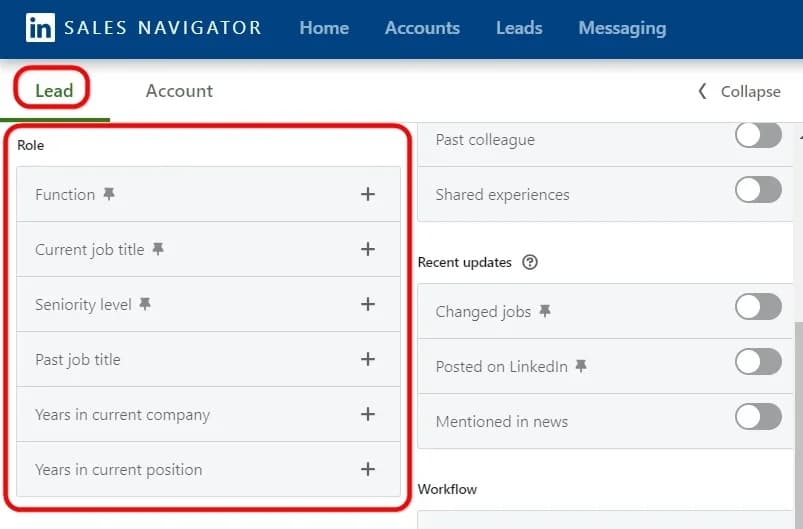
For saved searches, lists, and alerts, see how to use LinkedIn Sales Navigator for prospecting.
Sales Navigator is optional.
In a separate sample of nearly 11,000 campaigns from our State of LinkedIn Outreach H2 2026 report, Sales Navigator searches and CSV imports performed almost the same: 19.8% acceptance against 18.5%, with identical reply rates.
A clean list from your agency management system or a trade association directory works too. In Expandi, you can paste a Sales Navigator search URL straight into a campaign or upload a CSV.
2. Watch for growth triggers
A growth trigger is news that a business just got bigger or changed how it works: it hired, opened a new site, bought trucks, or took investment.
Each one means new coverage questions, so your first message can open with something the owner knows is true, like “saw you opened a second site.”
Here’s how business triggers map to commercial coverage lines:
| Trigger | Where it shows up | Coverage line to raise |
|---|---|---|
| Hiring push or headcount growth | Job posts, headcount growth on the company page | Workers’ comp, EPLI |
| New location or larger facility | Company posts, new job locations, local news | Commercial property, general liability |
| New vehicles or driver roles | Driver, dispatcher, and fleet manager job posts | Commercial auto and fleet |
| Outside investment or a new board | Funding announcements, new board members | D&O |
| Online payments or customer data | IT hires, product or ecommerce launches | Cyber |
| New CFO, COO, or risk lead | Job change on LinkedIn | Full program review (see way 3) |
Hiring raises a business’s workers’ comp cost because workers’ comp is priced on payroll: per The Hartford, your payroll is multiplied by a rate tied to your class code, set per $100 of payroll. On D&O, Insureon advises startups to buy it as soon as they have investors or an active board of directors.
Watching for public events like these is the core of signal-based outreach.
Expandi can also catch people who show interest in you: Expandi Signals picks up business owners who visit your profile or your agency’s company page, or engage with posts on topics you choose, and routes them into a campaign.
3. Catch new decision-makers in their first 90 days
A new CFO or COO inherits the insurance program along with every other vendor, which makes the first 90 days in the role the natural time to question it.
LinkedIn’s own data supports reaching them early: people who started a new job at a new company within the past 90 days were 62% more likely to accept a Sales Navigator InMail, based on LinkedIn’s analysis of every Sales Navigator InMail sent in 2022.
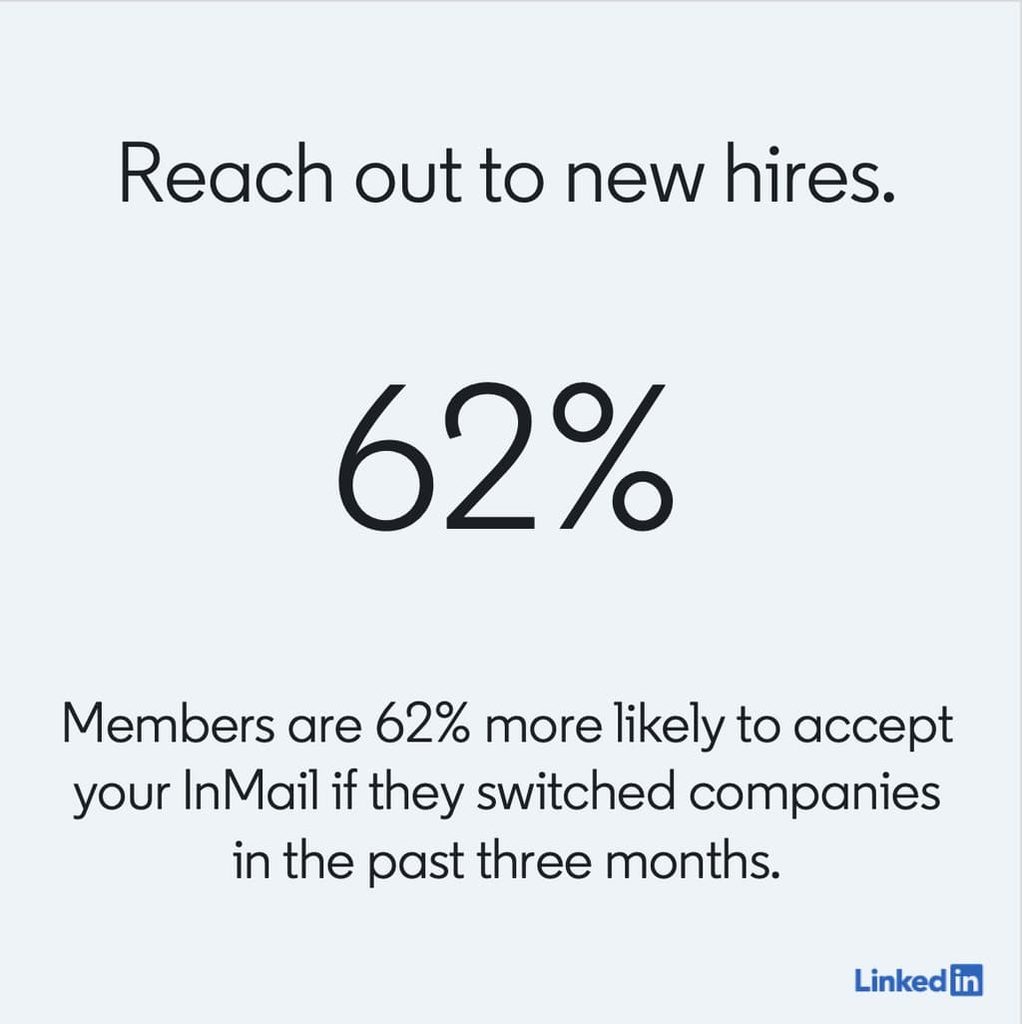
People promoted or moved within the same company were 51% more likely.
To find new decision-makers in your verticals:
- Open your saved vertical search in Sales Navigator.
- Add the Changed jobs filter, which shows people who changed jobs in the last 90 days.
- Narrow titles to CFO, COO, controller, and head of risk or safety.
- Save it as its own search with alerts.
Lead with the role change and offer a second opinion on the program before the next renewal.
A new finance lead has every reason to check whether the inherited coverage still fits the company.
4. Time outreach to renewal windows
Commercial policies renew on fixed dates, so a prospect’s renewal is the one buying moment you can plan months ahead.
Brokers are starting earlier: Insurance Business reported in September 2026 that Trucordia has moved much of its sales and renewal activity to between 120 and 150 days before expiry.
Rough Notes has long advocated a 120-day renewal timeline for commercial lines. If you want to win the account, you need to reach the owner before the current broker starts shopping the renewal.
Aim for first contact about 120 days before the expiration date, which agents call the X-date.
Track known X-dates on your saved accounts or in your CRM, and start the LinkedIn sequence four months out so your name is familiar before quotes go out.
5. Use AI to find and research commercial insurance leads
To find leads with AI, hand it the search and research steps and keep the message in your own hands. Three tools cover the research side.
Sales Navigator’s AI-assisted search lets you type a request in plain language, such as “owners of construction companies in Ohio with 20 to 200 employees,” and turns it into filters. Check that it’s switched on for your account, since LinkedIn rolled it out in stages.
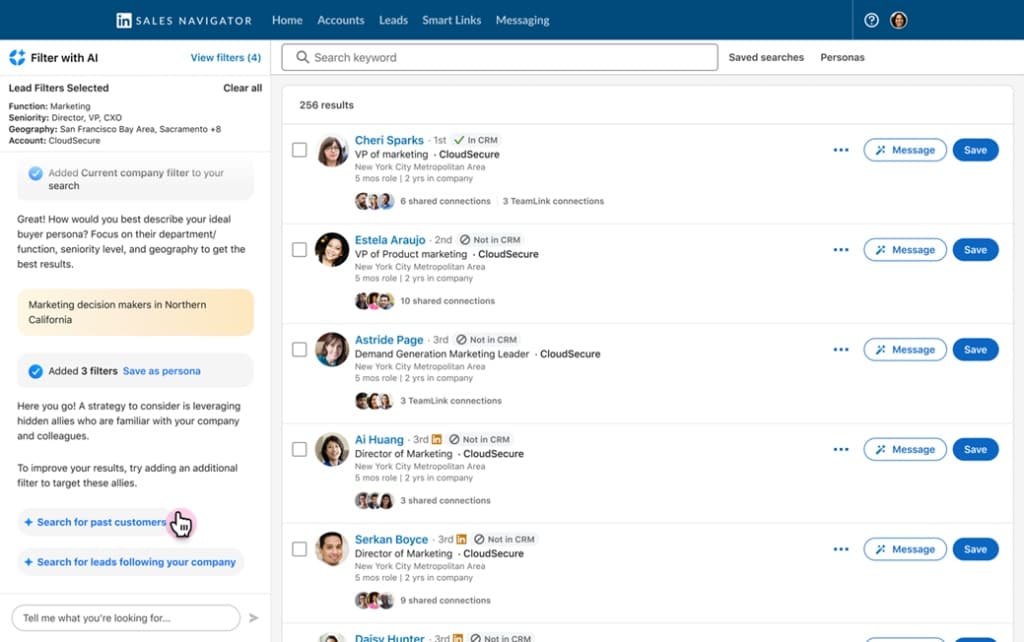
Account IQ summarizes a company from LinkedIn data such as the executive team and headcount growth, plus public information, and LinkedIn says it’s available with all Sales Navigator subscriptions. Lead IQ, its companion Sales Navigator feature, does the same for an individual buyer.
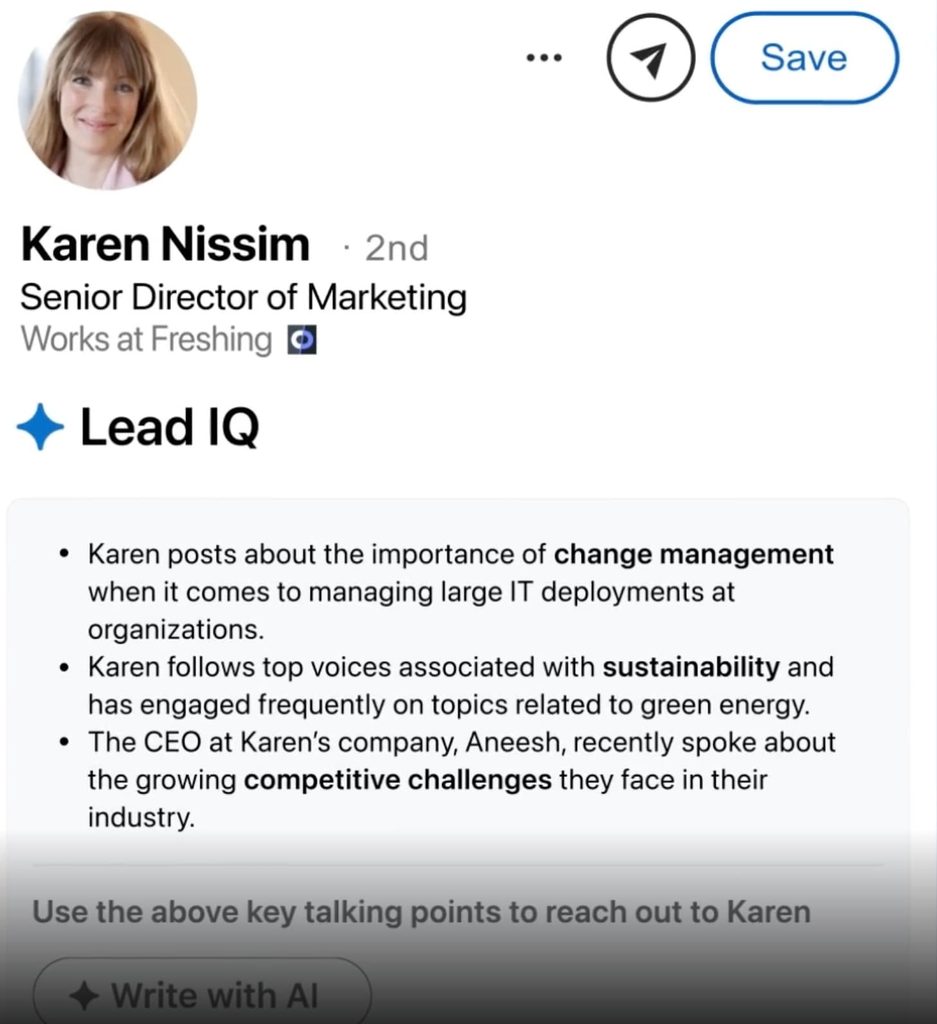
A general assistant like Claude can then scan a whole list for triggers. Export your list with company names and websites, turn on web search, and give it a prompt like this one:
“Here is a list of 40 construction companies in Ohio with 20 to 200 employees. For each one, check the company website and recent news for a new location, a hiring push for field or driver roles, a new CFO, COO, or safety lead, or a funding announcement in the last 90 days. Return a table with the company, the trigger, its date, the coverage line it points to, and one sentence I could reference in a first message. Skip any company with no trigger.”
Keep AI on research. In our H2 2026 data, AI-personalized messages were accepted 12% less often than human-written templates sent from the same accounts, with reply rates flat. Read the AI summary, then write the note in your own words.
Fabian Bacher, who leads an enterprise sales team at Semrush, described the research-first habit in a GTM Society interview:
“Really researching the LinkedIn profiles and using that with a short, concise message that speaks to both… our understanding of their role, but also our understanding of their online persona usually gets a lot of responses.”
Fabian Bacher, Semrush
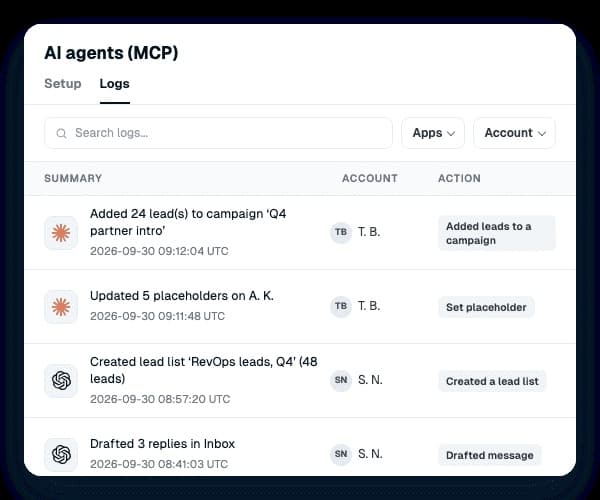
When the list is ready, Expandi MCP connects Claude or ChatGPT to your Expandi account.
Your AI can read the leads, draft the campaign, and write replies for you to approve, and it has no way to activate a campaign or send a message on its own.
For AI tools beyond LinkedIn, see our roundup of AI lead generation software.
6. Run personalized LinkedIn outreach sequences
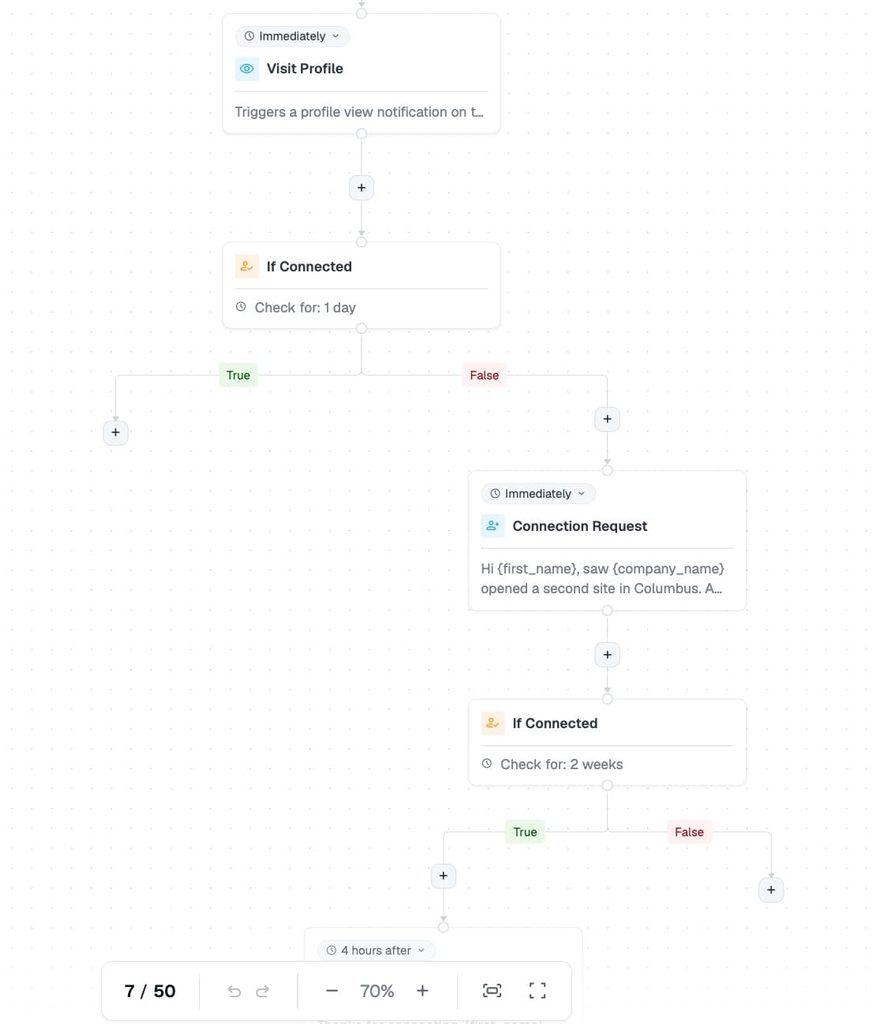
Once the list and the trigger are ready, run a short sequence on LinkedIn: a profile view, a connection request with a note, then three messages after they accept.
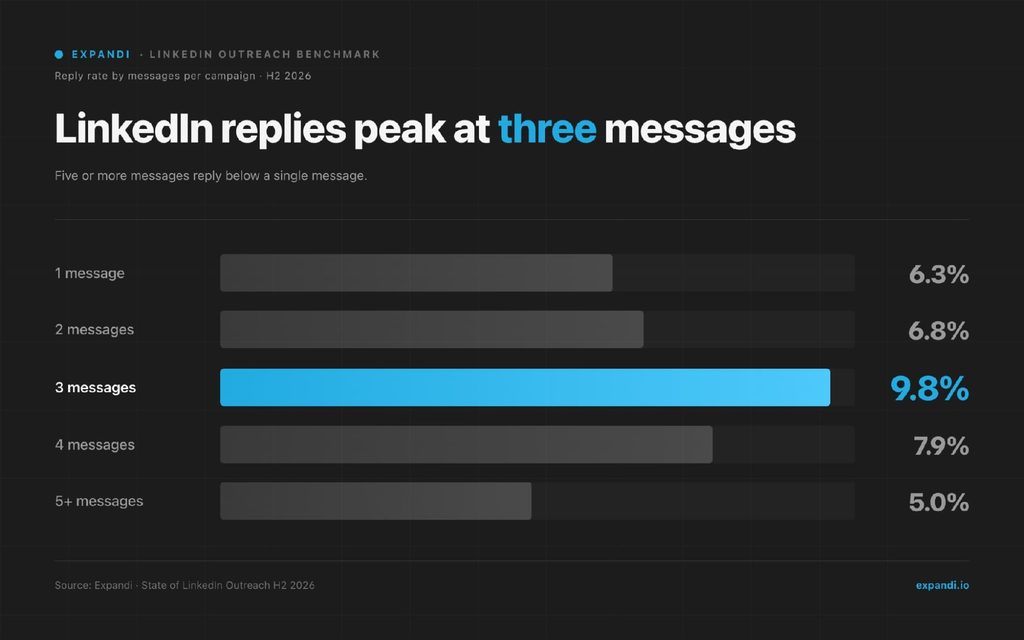
Three is the number to plan around. In our H2 2026 data, campaigns with three messages replied at 9.8%, and campaigns with five or more dropped to 5.0%, below a single message.
The follow-up matters even more in insurance.
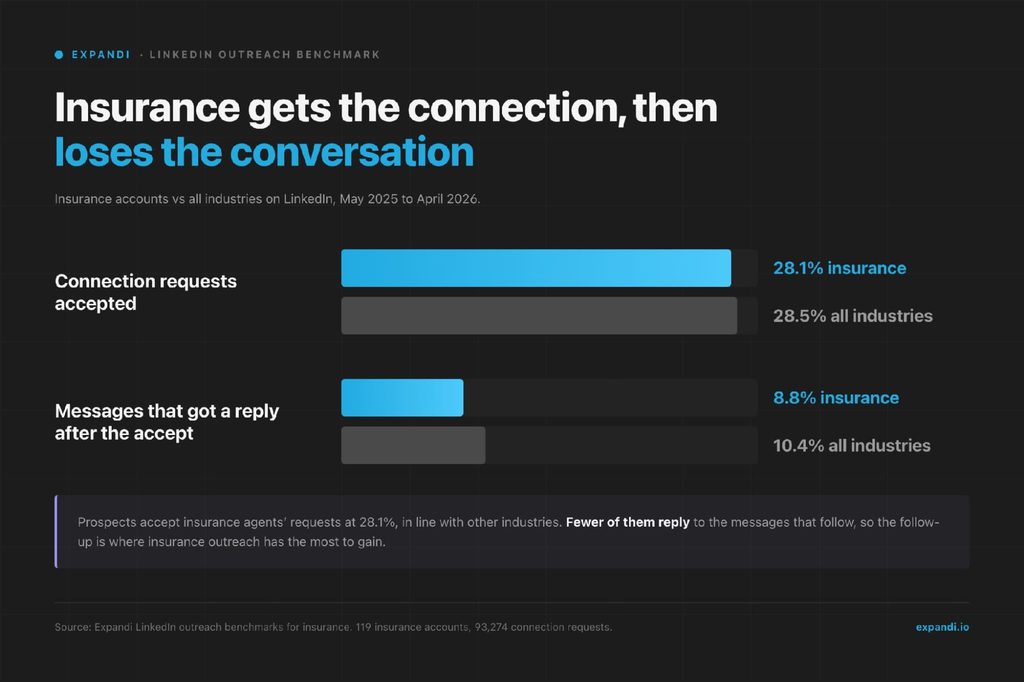
In our LinkedIn outreach benchmarks for insurance, prospects accepted 28.1% of insurance agents’ connection requests, about the same as the 28.5% average across all industries.
After that, only 8.8% of their messages got a reply, against 10.4% overall, one of the lowest reply rates of the 38 industries we track. Getting the connection is the easy part. The messages after it are where insurance outreach has the most to gain.
To set up a commercial insurance outreach sequence:
- Day 1: visit the prospect’s profile.
- Day 2: send a connection request with a note that names the trigger.
- After the accept: send a short thank-you with one question about the trigger.
- Three or four days later: send your strongest message, a specific offer such as a program review before renewal.
- A week later: send a short final note that leaves the door open.
Send connection requests between 7 and 11am, when acceptance runs about 32% against about 24% in the evening.
The messages after the accept are where insurance agents lose people, so write them with as much care as the note. To keep the conversation going after the accept:
- Open with the trigger you spotted at their business.
- Ask one question they can answer in a few words, such as whether the new site is on the property schedule.
- Save your offer for the second message, which gets more replies than any other message in the sequence in our data.
- Make the offer small and specific, such as a free 20-minute program review or a second quote before renewal.
- Keep the main messages between 150 and 200 characters, the length that got the most replies in our H2 2026 data.
- Close by asking for the renewal date, so a “not now” still gives you a date to come back to.
Here’s a full follow-up for a contractor that just opened a second location:
Message 1, a few hours after the accept: “Thanks for connecting, {first_name}. Quick question: with the new site up and running, has the property schedule been updated yet?”
Message 2, four days later: “{first_name}, I help contractors review GL, property, and workers’ comp before renewal. Happy to do a free 20-minute review for {company_name} and flag any gaps the new site opened up. Worth a look?”
Message 3, a week later: “Last note from me, {first_name}. If the timing’s off, when does {company_name}’s renewal come up? I’ll reach out a few months before so you have a second quote in hand.”
In Expandi, paste your Sales Navigator search URL into a campaign, then build these steps in Smart Campaigns, which branch on whether the prospect accepted your request.
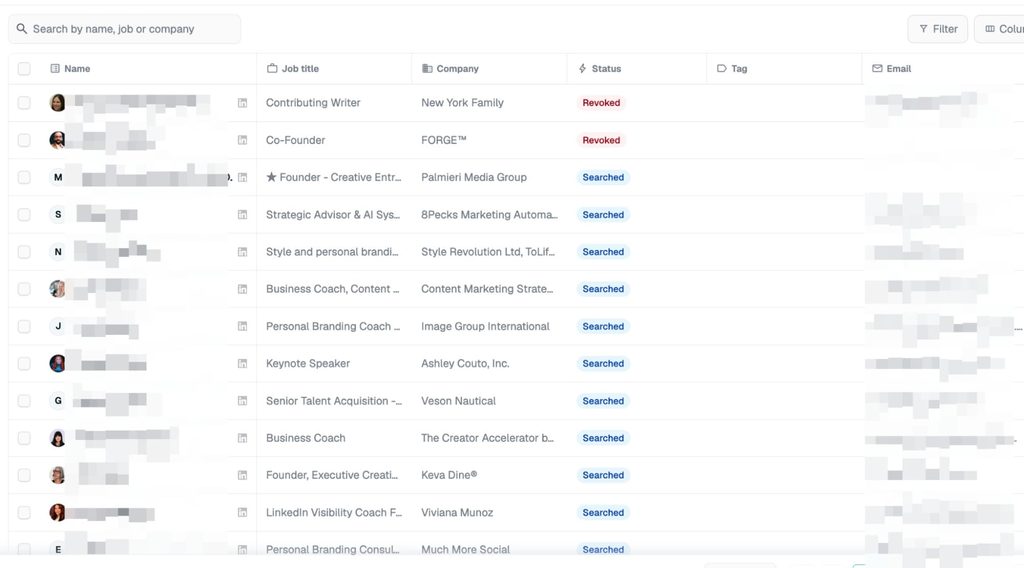
Placeholders such as {first_name} and {company_name} fill in automatically, and a custom placeholder can carry the industry or the trigger, so a contractor and a logistics firm get different openers.
Your LinkedIn profile is also your reputation in a local market, so pace the volume. Expandi runs each account from a dedicated country-based IP with warm-up and daily limits, and it stays inside LinkedIn’s weekly invitation limit.
Our LinkedIn message automation guide covers the full setup.
7. Warm up through local and industry groups
Business owners gather in chambers of commerce, trade associations, and the LinkedIn groups attached to them. A shared membership gives you something real to mention in your connection note.
In our H2 2026 data, connection notes that referenced an existing tie, such as a follow, a group, or a shared network, were accepted 1.8 to 2.7 times as often as a typical connection request with a note.
To warm up a vertical through groups:
- Join one or two associations per vertical, such as your state’s contractors association.
- Attend their events and join their LinkedIn groups.
- Mention the event or group in your connection note.
- Answer questions in the group before you pitch anything.
Only mention groups and events you actually belong to or attended.
Expandi’s Group campaigns can then message members of LinkedIn groups you share with them, which reaches owners who aren’t connected to you yet.
8. Publish content business owners search for
LinkedIn for insurance agents works on two fronts, outreach and visibility. Business owners check your profile before they accept a request, so posts that answer their coverage questions warm them up before your first message lands.
Write for the vertical you prospect, in the owner’s words. Post ideas that fit commercial lines as part of your LinkedIn content strategy:
- What GL limits does a 10-person contractor need?
- What a workers’ comp audit checks, and how to prepare for it.
- What changes on your commercial auto policy when you add drivers.
- Do you need D&O before your first outside investor?
- Cyber questions to ask before you take card payments online.
Michel Lieben, founder of ColdIQ, a sales prospecting agency, made the case for a long view in a GTM Society interview:
“Content creation as a strategy is something that compounds over time. You should have a long-term view. In the beginning, you shouldn’t see it as a way to generate leads but as a way to complement your other efforts and to generate trust.”
Michel Lieben, ColdIQ
9. Build referral partnerships with CPAs, attorneys, and business brokers
CPAs, business attorneys, and business brokers see a company at formation, growth, and sale, which is exactly when it needs new or different insurance.
To build referral partnerships that last:
- Pick partners who serve your verticals, such as a CPA firm that works with contractors.
- Send them clients first, so the relationship runs both ways.
- Give them something useful to hand out, such as a renewal checklist for their clients.
- Co-host a short session for their clients on a topic like workers’ comp audits.
Check your state’s rules before you offer any referral fee to a partner who isn’t licensed.
A weekly workflow for commercial insurance lead generation
A weekly workflow for commercial insurance lead generation runs the first six ways as one routine on a single vertical. Monday is for finding triggers, Tuesday for researching the accounts, and Wednesday to Friday for outreach and replies.
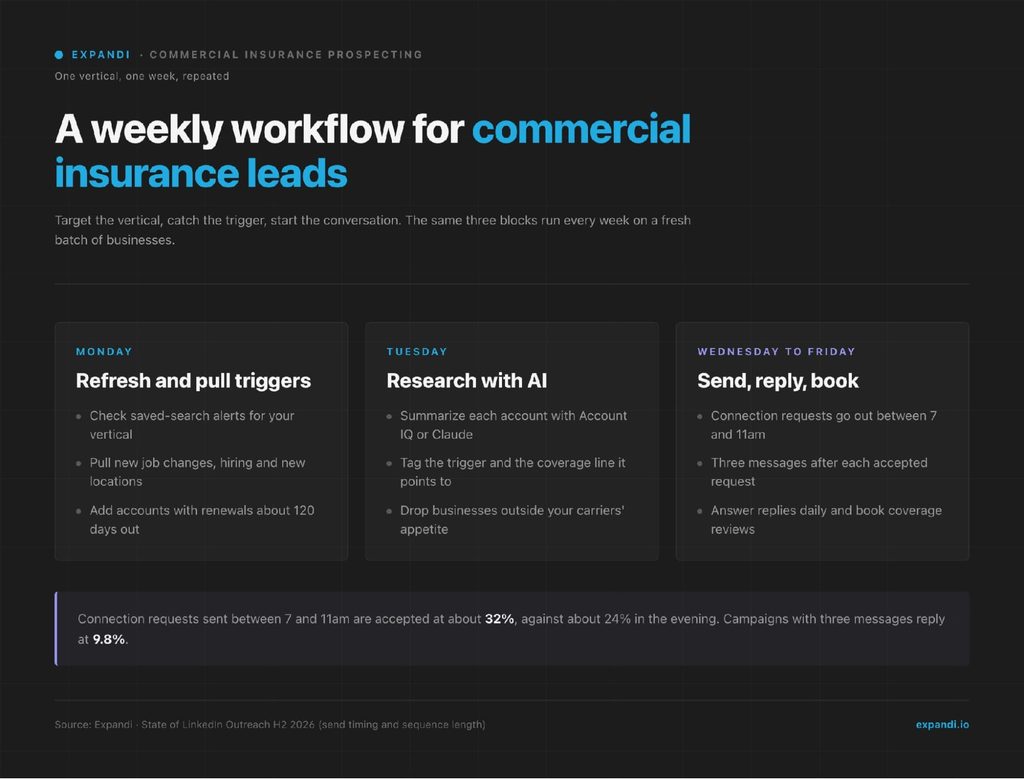
Here’s how the week breaks down:
- Monday: check saved-search alerts, pull new job changes, hiring, and new locations, and add accounts with renewals about 120 days out.
- Tuesday: summarize each account with Account IQ or Claude, tag the trigger and its coverage line, and drop businesses outside your carriers’ appetite.
- Wednesday to Friday: send connection requests in the morning, run the three-message sequence, answer replies daily, and book coverage reviews.
Agencies and MGAs running the workflow across several producers, and lead gen agencies running it for insurance clients, can share campaigns and leads in one workspace with Expandi for sales teams.
Commercial insurance outreach templates by trigger
Each commercial insurance connection outreach template below stays under 175 characters, which fits LinkedIn’s 200-character limit for connection notes and Expandi’s connection-note field. Swap in the details of the trigger you found.
For a business that opened a new location:
“Hi {first_name}, saw {company_name} opened a second site in Columbus. A new site means new property and GL limits to check. I work with Ohio contractors, glad to connect.”
For a new finance or operations hire:
“Hi {first_name}, congrats on the CFO role at {company_name}. If the insurance program is on your review list this year, I work with logistics firms. Glad to connect.”
For an upcoming renewal:
“Hi {first_name}, I work with Ohio manufacturers on commercial programs. If {company_name}’s renewal is coming up, I’d be glad to be a second set of eyes before it’s quoted.”
Plan what follows the accept, too. Our guide to LinkedIn follow-up messages covers when to follow up, what to say, and when to stop.
Commercial insurance lead metrics to track
Track commercial insurance leads as a funnel from first touch to bound policy, and compare your acceptance and reply rates with the insurance benchmarks rather than the all-industry average.
Our insurance data comes from 119 accounts that sent 93,274 connection requests between May 2025 and April 2026.
Acceptance rates differ more by industry than by anything else in our data, from 21.8% in the lowest industry to 36.5% in the highest. Measure your results against the insurance numbers below, and use the 28.5% all-industry average only as a rough reference.
The metrics to track for commercial insurance leads:
- Connection acceptance rate. Insurance accounts average 28.1%, against 28.5% across all industries.
- Message reply rate after acceptance. Insurance averages 8.8%, against 10.4% across all industries.
- Meetings or coverage reviews booked per 100 prospects contacted.
- Quotes issued per meeting, which shows how well your verticals fit your carriers’ appetite.
- Policies bound and premium written, tracked by lead source so you can compare built and bought leads.
If your agency’s company page lists financial services instead of insurance, compare against that row: financial services accounts average 26.0% acceptance and 10.3% message reply in the same dataset. For the rest of the funnel, see our list of lead generation KPIs to track.
Run the commercial insurance lead workflow on one vertical this week
Commercial insurance leads you build yourself come with a real reason to reach out, like a new site or a new CFO, and you reach the owner before renewal shopping starts.
- Pick one vertical.
- Save the search.
- Map its triggers to coverage lines.
- Run a three-message sequence timed to the X-date.
- Give it three to four weeks before you judge the numbers against the insurance benchmarks.
Start your 7-day free trial of Expandi and run your first commercial insurance campaign this week.
Commercial insurance leads FAQ
Buy commercial insurance leads as a short-term top-up while your own pipeline ramps, and only from vendors that tell you how many agents receive each lead. Track every source down to policies bound, since a cheap shared lead that never binds costs more than its price suggests. Move budget toward built leads once they convert.
Vendor-reported prices for commercial insurance leads run from about $5 for a seasonal web form to about $120 for a live transfer. Exclusive leads and phone transfers cost more than shared web forms. The number to manage is cost per bound policy: total spend on a source divided by the policies it produced.
You can find leads with AI and research them faster, but a person still decides who fits and writes the message. Sales Navigator’s AI tools and assistants like Claude can build a list from a plain-language request and flag triggers across it. Final calls on carrier appetite and the wording of each note work best in your hands.
LinkedIn automation is safest for insurance agents when it runs at human pace from a cloud tool with warm-up and daily limits. Any automation carries some account risk, so keep volume modest and messages personal. Check your state’s insurance advertising rules and your carriers’ social media policies before you post or send, since the NAIC’s model Unfair Trade Practices Act covers internet posts and electronic advertising.
The easiest industries are the ones your carriers write well and where business events show up publicly. Construction, trucking and logistics, healthcare practices, and manufacturing all post hiring, new locations, and fleet changes on LinkedIn. Pick the two or three where your markets are most competitive.
Ask for the expiration date, which agents call the X-date, in your first real conversation, and log it in your CRM or agency management system. If an owner declines a quote today, ask for the date anyway and offer to check the market before it renews. Set a reminder about 120 days ahead so your outreach starts before the incumbent remarkets.
LinkedIn doesn’t publish an official cap. A safe working assumption for a standard account is about 100 connection requests a week, and new or quiet accounts should start lower and build up over a few weeks. If acceptance drops, tighten the list before you raise the volume.


You’ve made it all the way down here, take the final step