10 Sales Productivity Tools Your GTM Team Needs in 2027

A prospect finally answers your rep’s LinkedIn message. That afternoon, your email tool fires off the scheduled follow-up anyway. It never saw the reply. That’s what happens when sales productivity tools see only their own activity: the rep becomes the glue, connecting them by hand.
A tool earns its seat only when it owns a job and connects to the tools around it, taking manual steps off someone’s plate. Here’s an example from one of our customers:
“Before, I spent hours operating Expandi,” says BelVG’s GTM engineer. Today he runs five LinkedIn sender profiles from Claude Code through Expandi MCP. He opens Expandi only to press the launch button.
Here’s what we’ll cover:
- Why tool sprawl can cost reps selling time, with recent survey numbers.
- A six-job map of the sales motion and three questions to ask any tool.
- Ten tools for sales reps and managers, mapped to the jobs they own, with the manual work each removes and an honest watch-out.
- A four-step way to cut tool sprawl and the three metrics that show it worked.
What are sales productivity tools?
Sales productivity tools are software that removes manual steps between finding a buyer and closing the deal. That covers prospecting, research, outreach, scheduling, proposals, call review and the CRM that records all of it.
The definition needs one qualifier most lists leave out. A tool only counts as productive if it removes a step. If it adds a place your reps have to check, it’s costing your team time, regardless of what the feature list promises.
You bought 5 sales productivity tools…why are your team now even LESS productive?!
Sales teams kept buying tools and yet selling time kept shrinking. Every new tool came with a hidden job: reconciling it with the others. Someone had to copy the reply into the CRM, pause the sequence when a prospect answered and check three dashboards to find out what happened. Nobody was hired to do that work, so the rep absorbed it.
The survey data shows the strain:
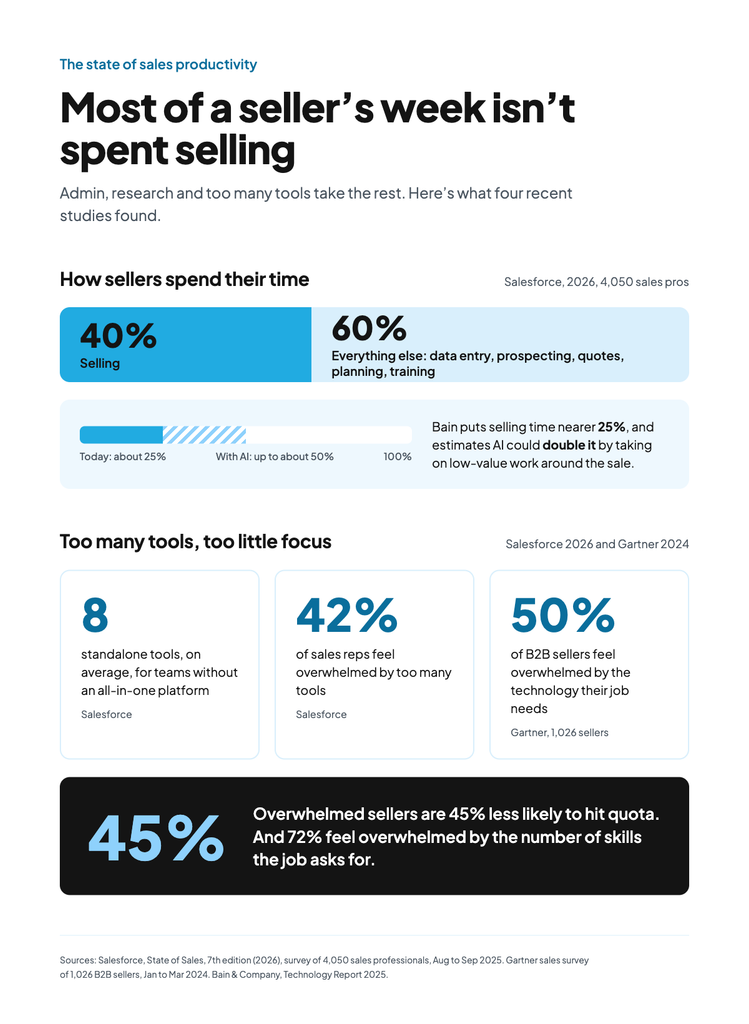
- Sellers spend only 40% of their time selling, per Salesforce’s 2026 State of Sales, a survey of 4,050 sales professionals. The other 60% is spent on non-selling work such as data entry, lead research and switching between tools.
- Teams without an all-in-one platform run an average of eight standalone tools, and 42% of reps say they’re overwhelmed by too many tools, according to the full 2026 report.
- 50% of B2B sellers feel overwhelmed by the technology their job needs and 72% by the skills it requires, per a 2024 Gartner survey of 1,026 sellers. That matters: overwhelmed sellers are 45% less likely to hit quota.
- Bain’s estimate is even lower. Its Technology Report puts sellers’ time spent selling to customers at about 25%, and says AI could double that share by taking on much of the low-value work around the sale.
The data suffers too. In Validity’s State of CRM Data Management in 2025, 76% of respondents said less than half of their CRM data was accurate and complete. When activity lives in ten places, the system of record stops being one.
So the goal isn’t a bigger stack. It’s one where each tool has a clear job and hands off to the next automatically.
Our breakdown of how many GTM tools you really need works through the same question layer by layer, including what over-tooling costs.
How to choose the right sales productivity tools for your GTM motion
Before you compare features, ask a simpler question: what job will this tool do in your motion?
Every tool should own a clear job, such as finding accounts or running outreach, and pass its output to the next tool without a rep in the middle. Two tools doing the same part of a job is an overlap to cut.
The motion is the operating side of your go-to-market strategy. The strategy sets who you sell to, and the motion is the work that turns those targets into closed deals.
1. Map each job in the sales motion before you shop
Six jobs make up the motion from first search to signed deal. Two layers run under all of them: the CRM as the record and an automation layer that connects the tools.
Here’s what each job in the sales motion does and what breaks when nothing owns it:
| Job | What it covers | What breaks without an owner |
| Find | Building lists of accounts and buyers that fit your ICP | Reps prospect from memory and old spreadsheets |
| Decide | Picking who to contact now, based on buying signals | Outreach goes to whoever is next on the list |
| Prepare | Research, enrichment, and drafting the first message | Generic messages, or hours of tab-hopping per account |
| Run | Sending sequences and handling replies across channels | Follow-ups go out after a prospect already answered |
| Close | Booking meetings, sending proposals, and getting signatures | Deals stall in scheduling email chains and unread PDFs |
| Improve | Reviewing calls and results to coach the team | The same mistakes repeat across every rep |
Now fill the table with what you pay for today. Any job with no owner is a gap. Any job with two tools doing the same work is spend you can cut.
Mapping the motion this way also shows where leads drop between stages of your B2B sales funnel.
Three questions to ask before buying a sales productivity tool
Run every tool you pay for, and every tool you’re trialing, through these three questions:
- Does it remove a step? Name the manual task that disappears. If you can’t, it’s adding a tab.
- Does it write back to your CRM? Activity that stays inside the tool is invisible to your manager, your pipeline review and the next rep who picks up the account.
- Can you see what its AI did, and approve it? If a tool drafts, sends or updates records with AI, you need a log of what it did and a gate before anything reaches a buyer.
A tool that fails the first question goes. One that fails the second or third needs a workaround, and workarounds are where reps lose their afternoons.
Quick comparison of the 10 tools on this list
These 10 sales team productivity tools cover every job in the motion, plus the record and connection layers underneath:
| Tool | Job in the motion | Primary user | Manual work it removes |
| HubSpot Sales Hub | Record | Sales leaders and RevOps | Logging emails and in-app calls by hand |
| LinkedIn Sales Navigator | Find | SDRs and AEs | Searching LinkedIn account by account |
| Clay | Prepare (research and enrichment) | RevOps and GTM engineers | Researching and enriching leads one at a time |
| Expandi | Decide and run | SDRs, sales teams, and agencies | Tracking warm prospects and sending LinkedIn follow-ups by hand |
| Claude or ChatGPT via MCP | Prepare (drafting and setup) | Reps and GTM engineers | Copying records, lists, and drafts between tools by hand |
| Gong | Improve | Sales managers | Listening to calls to find coaching moments |
| Calendly | Close (booking) | AEs and SDRs | Trading emails to find a meeting time |
| PandaDoc | Close (proposals and signatures) | AEs | Building proposals and guessing when buyers read them |
| Zapier or Make | Connect (data) | RevOps | Copying data between tools without a native integration |
| Slack | Connect (team alerts) | The whole sales team | Checking each tool for deal updates and replies |
The 10 best sales productivity tools for GTM teams in 2027
Each of the 10 best sales productivity tools below owns a clear part of the motion. Every entry names its job, who the tool fits, the manual work it removes, and a watch-out to weigh before you buy.
1. HubSpot Sales Hub: the system of record your stack writes back to
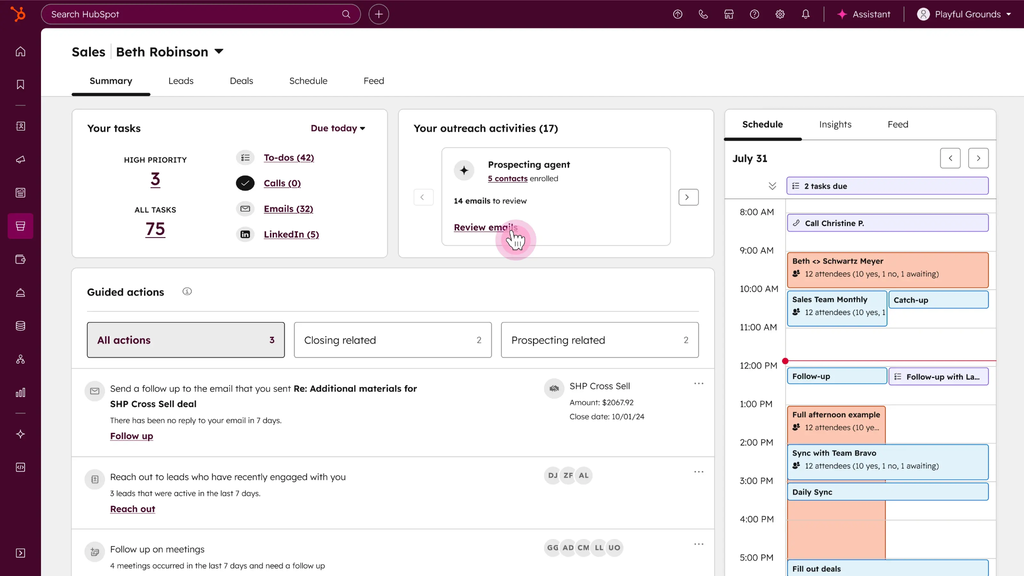
HubSpot Sales Hub runs on HubSpot’s Smart CRM, where connected tools write their activity so a rep or manager sees one record per deal. Its job is the record layer under the whole motion.
Sales Hub tracks deals through pipelines and books meetings through scheduling links tied to a rep’s calendar. Its Professional and Enterprise plans add email sequences.
The manual work it removes is logging emails and in-app calls by hand. Connecting Gmail or Outlook logs emails to the contact record automatically, and HubSpot saves every call placed through its own calling tool.
Its prospecting agent, available on paid Sales Hub plans and billed in HubSpot Credits, researches accounts and drafts outreach. A review setting holds each email for approval before it goes out.
Best for: sales leaders and RevOps teams at small and mid-market companies who want CRM and sequencing in one place. Salesforce Sales Cloud is the enterprise alternative for teams with complex territories and custom objects. Expandi syncs with both, which our Expandi CRM integration guide walks through.
Watch-out: a CRM is only as useful as its data. In Validity’s 2025 State of CRM Data Management report, 76% of respondents said less than half of their organization’s CRM data is accurate and complete. Connect every tool below so its activity reaches the CRM without a rep copying it, or the record drifts.
2. LinkedIn Sales Navigator: find accounts and buyers on LinkedIn
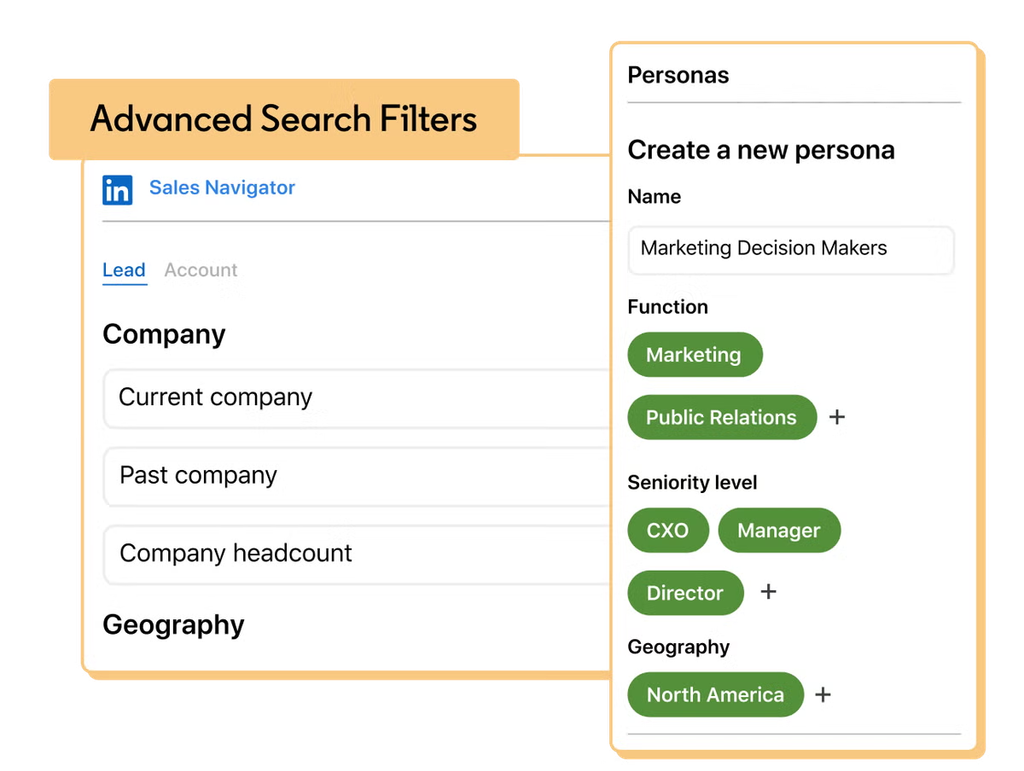
LinkedIn Sales Navigator is LinkedIn’s paid prospecting tool for finding accounts and buyers, and it owns the find job for teams whose buyers are active on LinkedIn.
Reps search with 50+ lead and account filters, save the results to lists, and get weekly alerts when saved searches turn up new matches. Account IQ and Lead IQ summarize a company or a person before the first message.
Best for: SDRs and AEs who prospect named accounts. Our guide to Sales Navigator filters covers the order to stack them, from broad fit filters down to job changes and recent posts.
The manual work it removes is searching LinkedIn one profile at a time and keeping a spreadsheet of who fits. Expandi can turn a Sales Navigator search URL into a lead list of up to 2,500 people and auto-assign it to a campaign.
Watch-out: CRM sync, which lets reps create or update CRM records and log LinkedIn activity from Sales Navigator in a few clicks, requires the Advanced Plus plan. On HubSpot, it also needs a Sales Hub Professional or Enterprise seat. On Core and Advanced, the list lives in Sales Navigator until another tool moves it.
For other ways to build the top of the list, see our roundup of B2B prospecting methods.
3. Clay: research and enrich leads before outreach starts
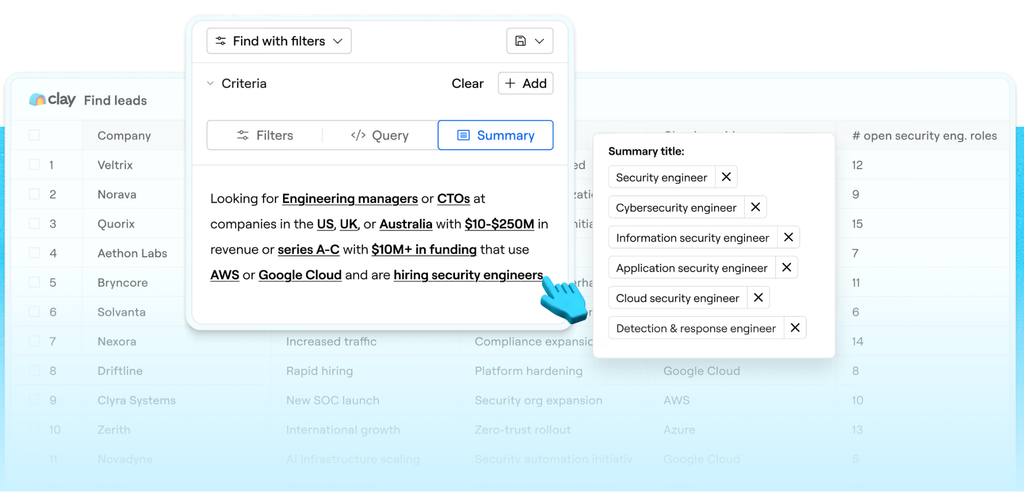
Clay fills the data gaps in a lead list before outreach starts. It owns the research and enrichment side of the prepare job, between building the list and writing the first message.
Its waterfall enrichment checks data providers one after another until it finds an email, phone number, or company detail. Claygent, Clay’s AI research agent, reads websites and answers questions about each account, such as what tools a company uses or whether it’s hiring.
Best for: RevOps teams and GTM engineers who build lists from several sources and want one table to clean and score them. Our walkthrough of the Clay and Expandi integration shows how an enriched table feeds a LinkedIn campaign.
The manual work it removes is opening a dozen tabs per account to find a title, an email, or a reason to reach out.
Watch-out: Clay bills usage in actions and data credits, and CRM integrations are only included on the Growth and Enterprise plans. A table that enriches every row on every run burns through both, so set a run condition that enriches only the leads that pass your ICP filter.
4. Expandi: decide who to contact and run LinkedIn outreach
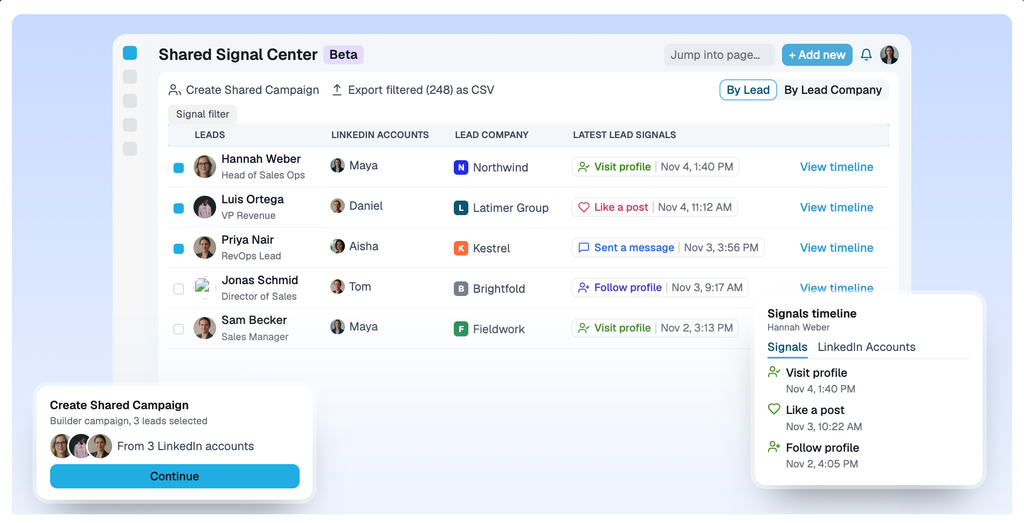
Expandi is a cloud-based sales automation platform that picks who to contact from the buying signals you choose, then runs the sequences on LinkedIn and email. It owns the decide-and-run jobs for teams whose buyers are largely on LinkedIn.
Best for: SDRs, sales teams, and agencies running LinkedIn outreach. The manual work it removes is watching for warm prospects, then sending and pausing follow-ups by hand.
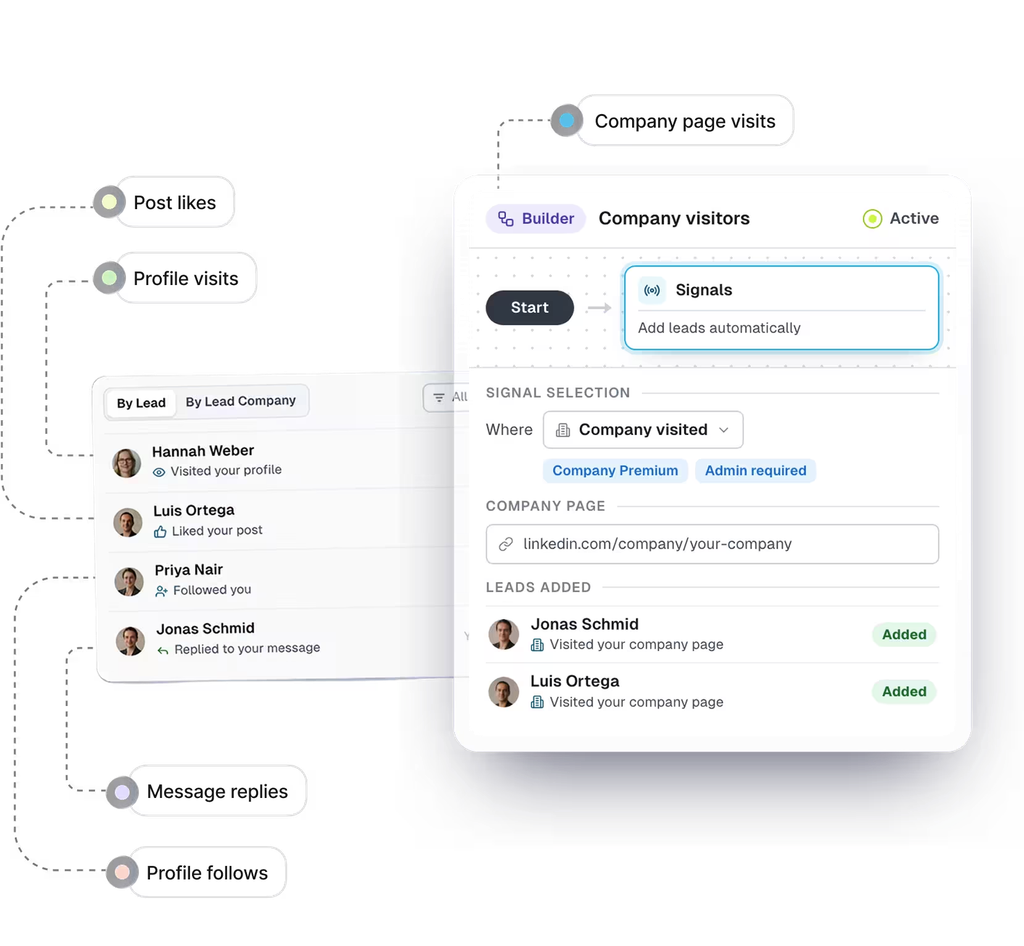
Expandi Signals track five actions that show someone noticed you:
- Profile visits.
- Company page visits.
- Follows.
- Reactions or comments on a post.
- Replies.
Profile visits, company page visits, and post engagement, even on a CFBR post, can fill a campaign automatically, so the first message lands while the interest is fresh. Follows and replies show up in Signals Center.
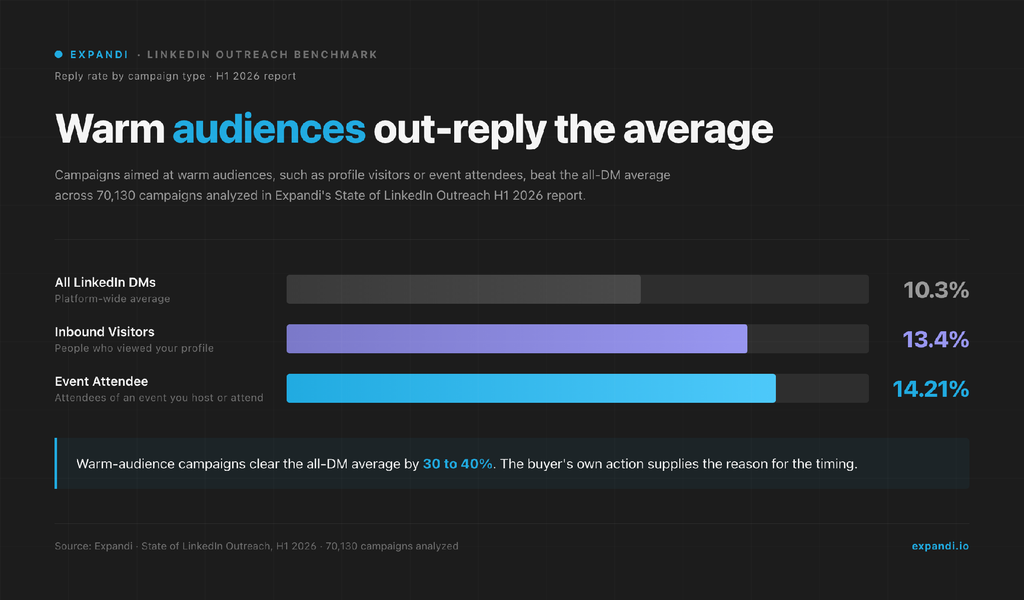
Warmer audiences reply at a higher rate.
In our State of LinkedIn Outreach H1 2026 report, Inbound Visitors campaigns, aimed at people who viewed your profile, replied at 13.4%. Event campaigns, which message attendees of LinkedIn events you attend or host, replied at 14.21%, against a 10.3% average for LinkedIn DMs.
Semir Jahic, founder of Salesmotion, an account intelligence platform for sales reps, described the same approach in a GTM Society interview:
“…I’m really structured around who’s following me, who’s engaging with my posts, who’s engaging with our company page, who’s following it. And I kind of target them very specifically with my approaches and tailor my outreach to them.”
Semir Jahic, Salesmotion
The run job happens in the Campaign Builder. If-then conditions move a lead down a different path when they accept your connection request or visit your profile, and a reply pauses the lead automatically.
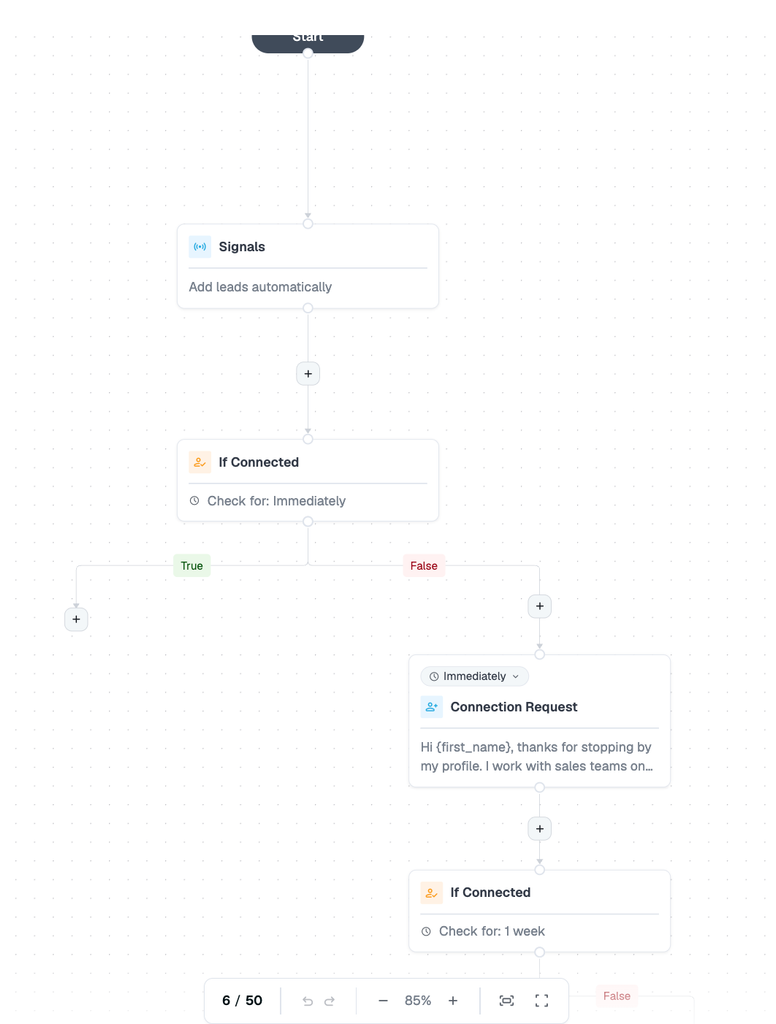
Our LinkedIn outreach strategy breakdown covers sequence length and when to pitch.
For teams, Global Inbox puts every campaign reply from every rep’s LinkedIn account in one list.
Workspaces add Shared Campaigns, where one campaign splits its leads across several LinkedIn accounts so no prospect hears from two reps. Native CRM integrations sync leads into HubSpot, Salesforce, or Pipedrive.
Email steps already run in Builder campaigns through a connected mailbox, though Shared Campaigns can’t include them yet. Expandi Email, a beta rolling out in batches by request, lets you connect up to ten mailboxes per LinkedIn account.
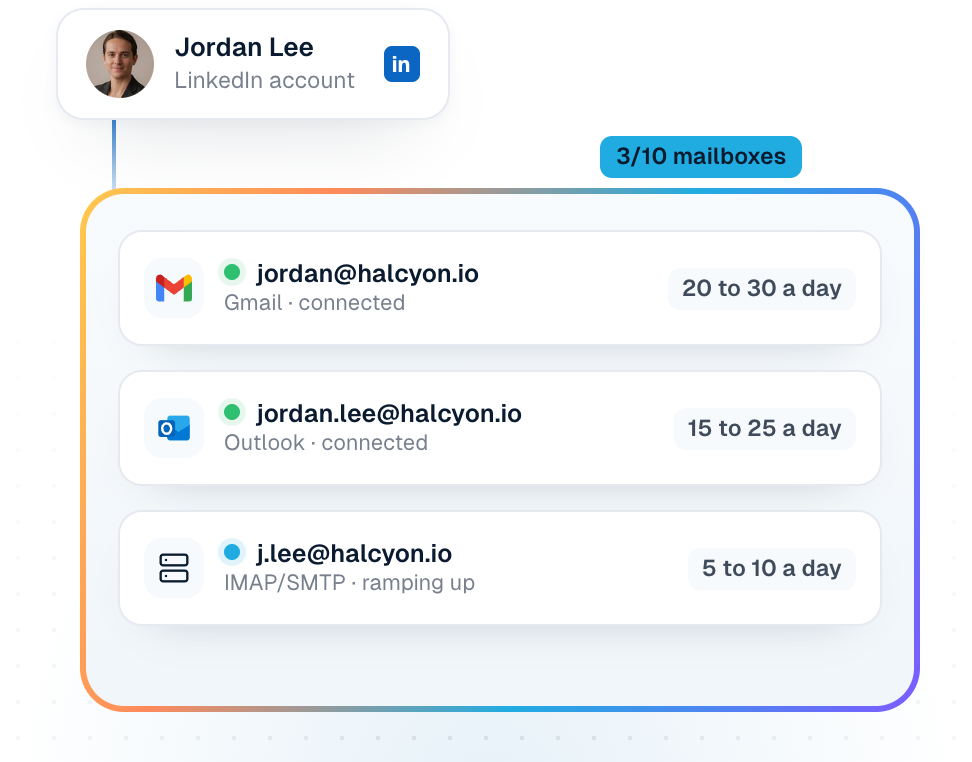
Account safety works through five controls:
- A dedicated, country-specific cloud proxy for each LinkedIn account.
- A gradual warm-up you can switch on, which ramps an account from 5 to 21 actions a day over about 14 days.
- Daily limits and active hours you set, which cap how many actions go out and when.
- Duplicate blocking across LinkedIn accounts in the same Expandi company, which stays on unless your team turns it off.
- An approval step for AI copy: campaigns built through Expandi MCP stay inactive until you launch them, and AI-drafted replies wait for a person to send them.
In our BelVG case study, the company’s five LinkedIn profiles sent 7,696 connection requests in 90 days, with 442 replies and no restricted account in ten months.
Watch-out: profile-visit and follow signals need LinkedIn Premium or Sales Navigator. Company page visits need one of those too, plus admin rights on a Premium company page. Expandi checks for new signal leads about every 24 hours.
5. Claude or ChatGPT connected through MCP: prepare the work
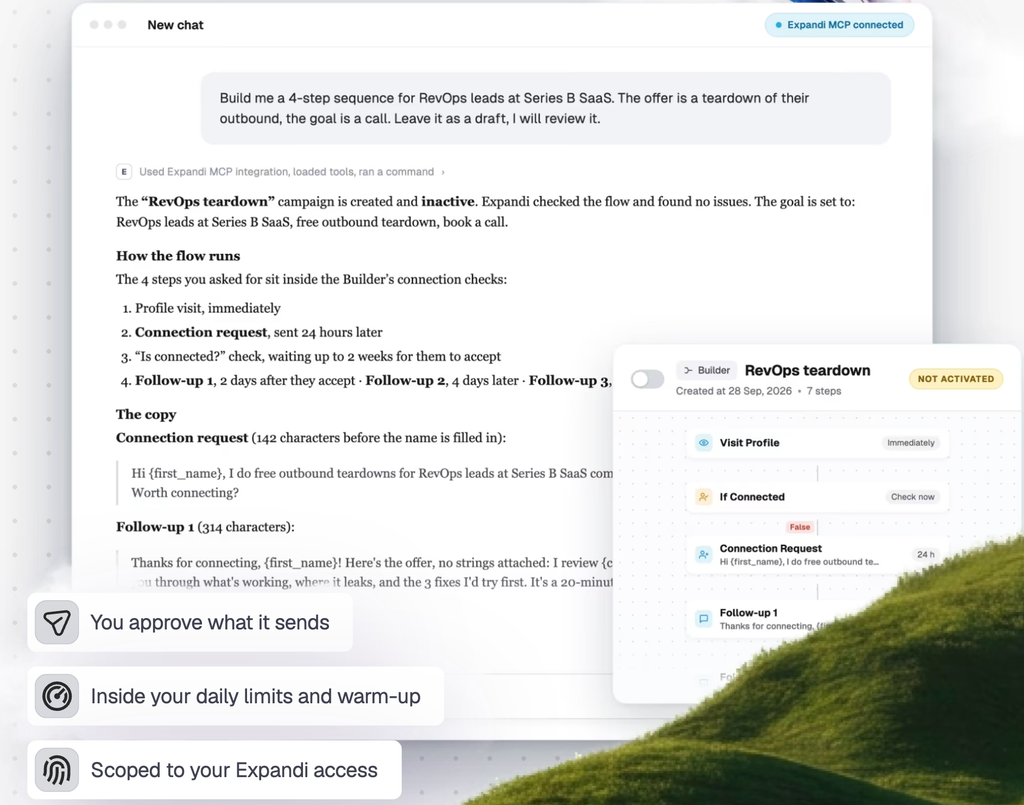
An AI assistant connected through MCP prepares the work inside the tools you already run.
MCP, the Model Context Protocol, is a standard way for an AI assistant to read and write data in other software.
Apart from Sales Navigator, every other tool on this list publishes an official MCP server. With HubSpot’s, Clay’s, and Gong’s connected, one chat can update a deal record, enrich a contact, and check what a buyer said on a call.
For example, with Expandi MCP, you describe the ICP and the offer, and the assistant qualifies leads into a list and drafts your campaign. It also drafts replies and explains why sending stalled, but it can’t activate a campaign or send a message without your approval. You can run LinkedIn automation and email outreach using ChatGPT, Claude or your other AI assistants.
Best for: reps and GTM engineers who already plan outbound in an AI assistant. The manual work it removes is copying records, lists, and drafts between the assistant and each tool by hand.
Watch-out: drafts are only as good as the brief you give the assistant. Give it your ICP, offer, and tone, and still edit what it writes before it goes out.
6. Gong: improve with call insights and coaching
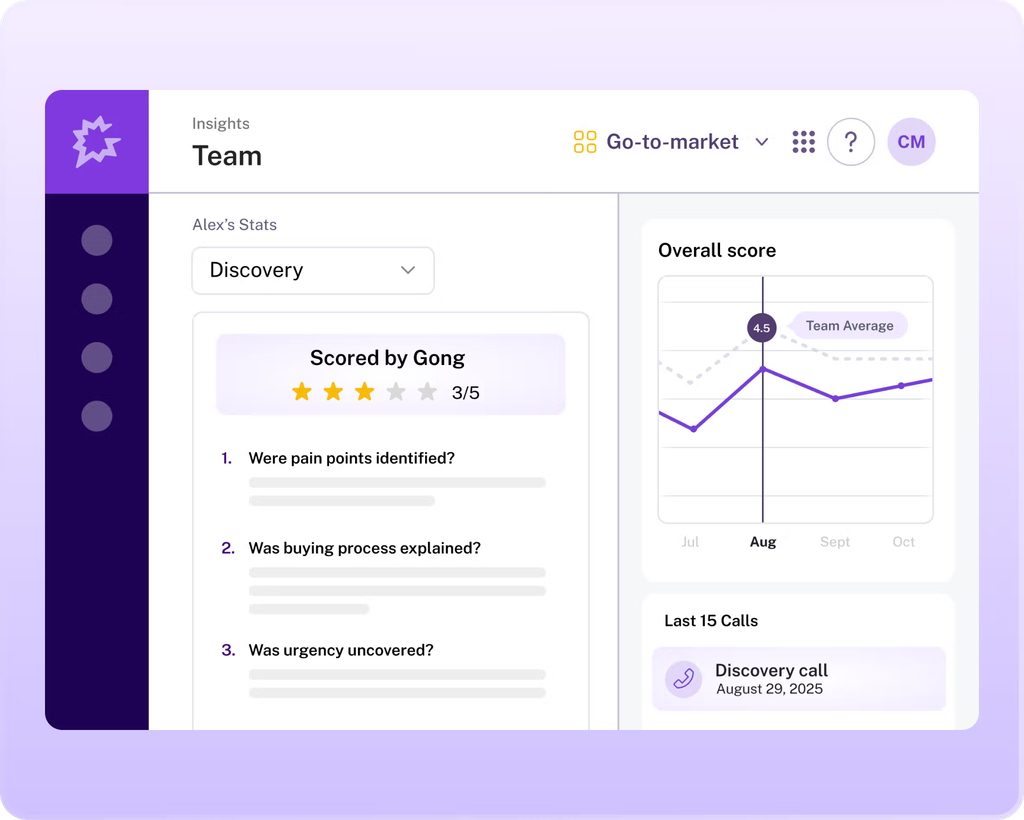
Gong records and transcribes sales calls and meetings, then turns them into coaching and deal insight. It owns the improve job, where a team learns from what happened in its own conversations.
Managers search calls by topic, competitor, or objection. Deal boards flag risk, such as a buyer going quiet or sending a red-flag email. Gong’s AI agents summarize calls and, with Gong Forecast, score how likely each deal is to close. Its Salesforce integration imports CRM records into Gong and writes call summaries back to Salesforce.
Best for: sales managers coaching a team of AEs on discovery and objection handling.
The manual work it removes is sitting in on calls or chasing reps for notes to find the moments worth coaching.
Watch-out: Gong only pays off if managers review the calls and coach from them. A library of recordings nobody watches is a cost line with no change in win rate, so put a weekly review on the calendar before you buy seats.
7. Calendly: close the gap between a reply and a meeting
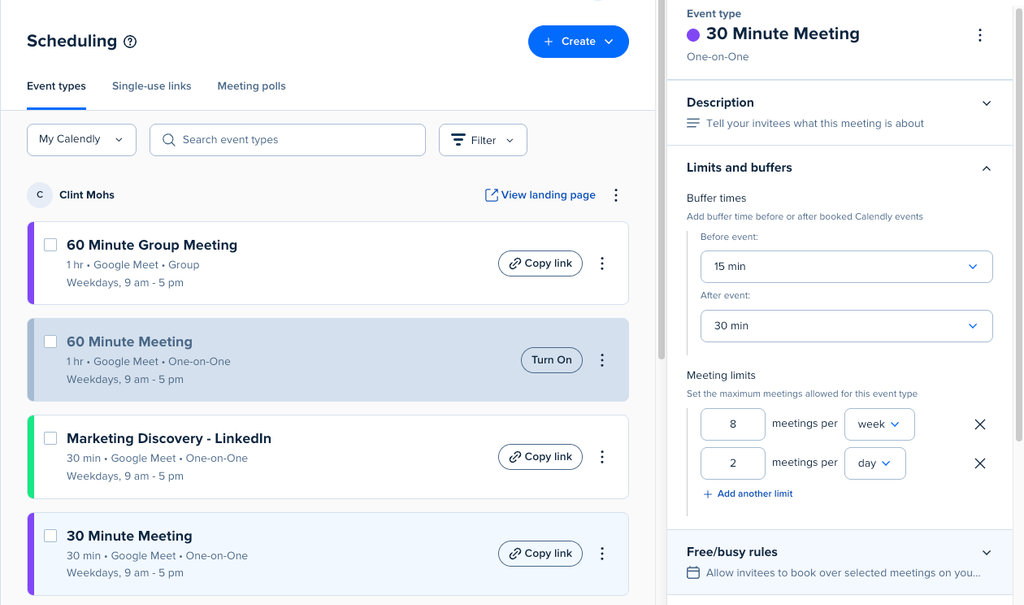
Calendly turns a positive reply into a booked meeting without the back-and-forth over times. It owns the first part of the close job, the gap between “sounds interesting” and a calendar invite.
Reps share a link or drop available times straight into a Gmail or Outlook email. Round-robin distribution spreads meetings across the team, and routing forms match known leads to the right rep using HubSpot or Salesforce data. The HubSpot integration logs the meeting as soon as it’s booked and creates the contact if it’s new.
Best for: SDRs and AEs who book meetings from replies, and teams that hand meetings from SDRs to AEs.
The manual work it removes is the three-email chain that lets a warm prospect cool off.
Edmund Frey, who runs Edventure Capital, investing in smaller tech companies and advising boards on go-to-market, made the case for a live call in a GTM Society interview:
“There’s nothing more valuable than pick up the phone and call your customer. LinkedIn is great for research, great for the first touch, but you got to talk.”
Edmund Frey, Edventure Capital
Watch-out: the HubSpot integration needs a paid plan, starting with Standard. Round robin, routing, and the Salesforce integration sit on Teams or higher, and Salesforce-based routing needs Enterprise. Sending a link as the first message also reads as presumptuous, so offer it once the prospect has said yes to a call.
8. PandaDoc: send proposals and close with e-signature
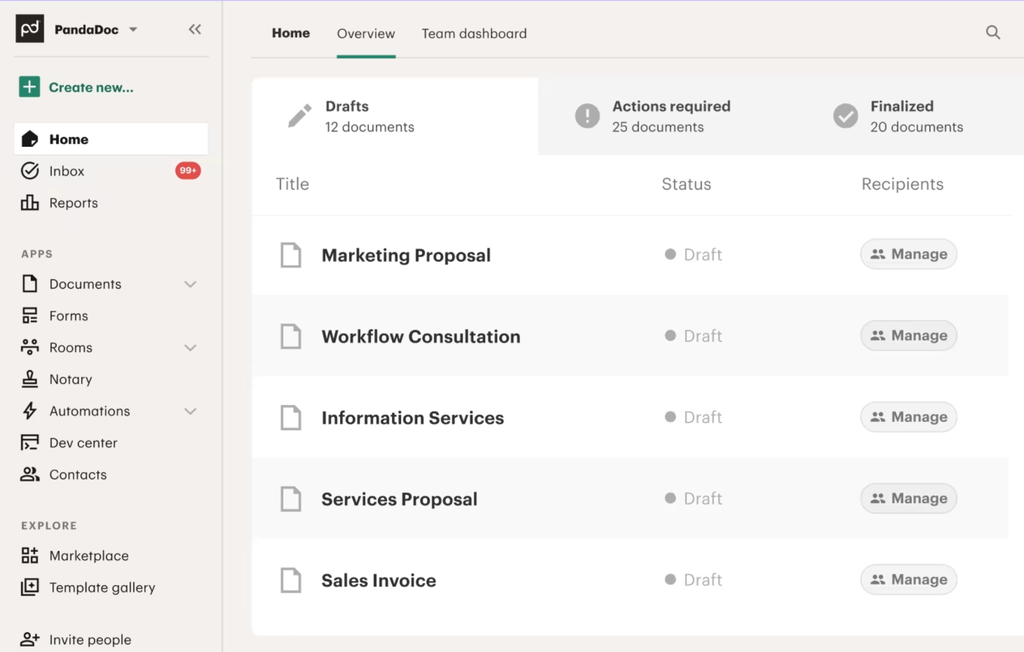
PandaDoc builds proposals and quotes, collects e-signatures, and tells the rep when the buyer opens the document. It owns the second half of the close job.
Templates pull deal details from HubSpot or Salesforce, so a rep stops rebuilding the same proposal by hand. Signatures are legally binding under E-SIGN and UETA, and every document keeps an audit trail.
Best for: AEs who send proposals or order forms on every deal.
The manual work it removes is formatting proposals, emailing PDFs, and guessing whether the buyer has read them. Open notifications tell the rep when to follow up, which beats a check-in sent on a fixed schedule.
Watch-out: the HubSpot and Salesforce integrations need the Business plan or higher, and Salesforce costs extra as a paid add-on. A team closing a few deals a month on a standard order form can skip PandaDoc for now, since a template and a basic e-signature tool cover it.
9. Zapier or Make: connect the jobs native integrations miss
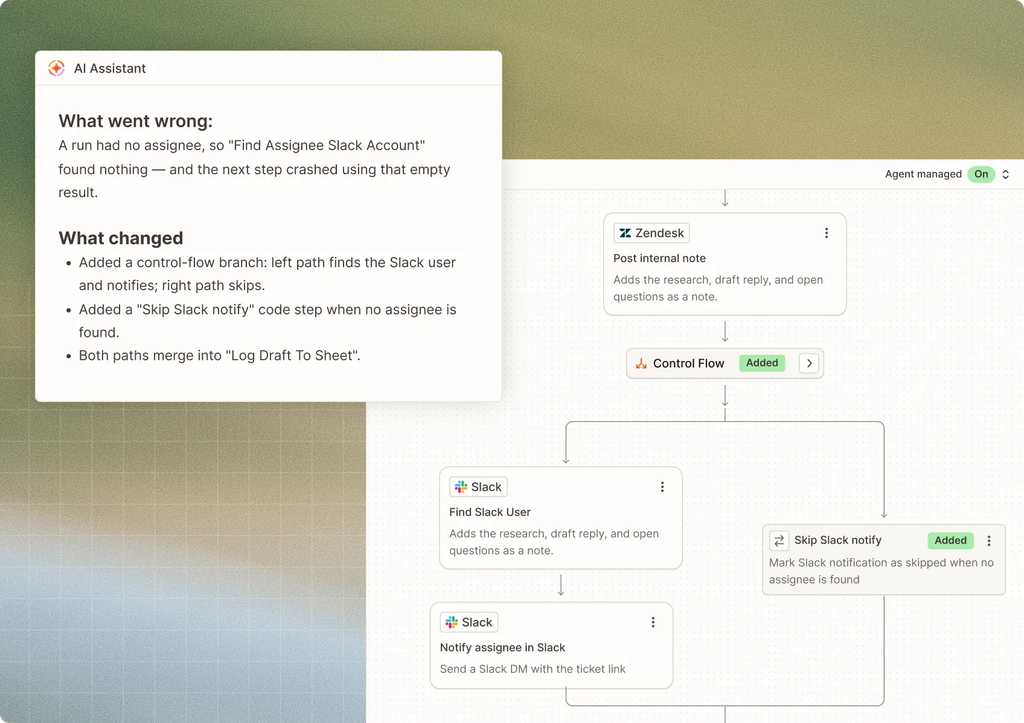
Zapier and Make connect tools that have no native integration, so data moves between them without a person copying it. They own the connection layer under the motion.
Zapier links 9,000+ apps through Zaps, automated workflows that run when a trigger fires. Make offers 3,500+ apps and builds multi-step scenarios on a visual canvas, which suits branching logic.
Expandi connects to both through webhooks, so a new reply or accepted connection can trigger an action in another tool. On Zapier, webhooks need a paid plan.
Best for: RevOps teams and GTM engineers filling the gaps between tools. Our GTM engineering guide covers how those teams design the workflows.
The manual work it removes is exporting a CSV from one tool and importing it into another every week.
Watch-out: every Zap or scenario is something someone has to maintain. Hard errors trigger an email by default, but a renamed field can pass blank data with no alert. Give every automation an owner and a short note on what it does.
10. Slack: run deal alerts and team selling in one channel
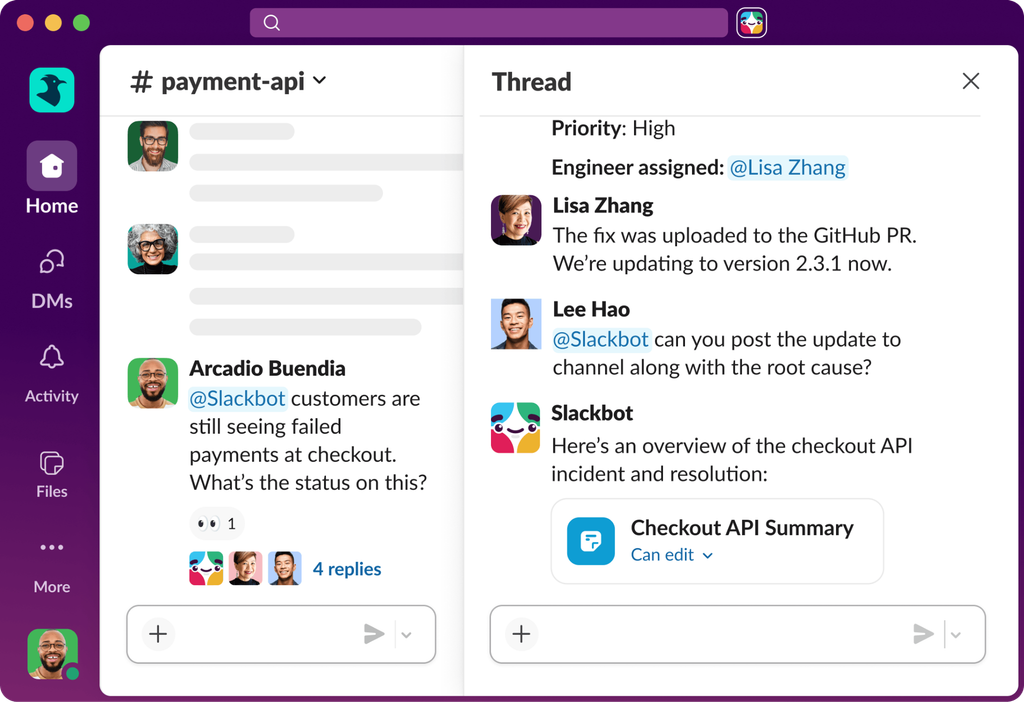
Slack puts deal alerts and replies in the channel where the team already works, which makes team selling faster. It owns the team side of the connection layer.
The HubSpot app for Slack alerts reps when a deal is assigned to them or when a deal they own or follow changes stage. A deal can also be linked to a channel that gets an alert whenever a new call, note, or meeting is logged on it.
Salesforce channels tie a channel to a Salesforce record, such as an account or opportunity, where the team can discuss it and update its fields. Slack Connect opens a shared channel with a customer’s team.
Best for: sales teams where an AE, an SE, and a manager work the same deal.
The manual work it removes is checking the CRM, the inbox, and the outreach tool separately for updates. Expandi has no native Slack app, but its webhooks can post new LinkedIn replies to a Slack channel through Zapier or Make.
Watch-out: a channel that gets every alert turns into noise the team mutes. Send only the events someone needs to act on, such as a positive reply, a stage change, or a signed proposal.
How to build a sales productivity stack without tool sprawl
Build a sales productivity stack by auditing what you pay for, giving each tool a clear job, cutting overlaps, and confirming each tool’s activity reaches the CRM. The order matters, because cutting before you map the jobs can remove a tool something else depends on.
To build a sales tech stack without tool sprawl:
- Audit every tool you pay for, with seats, owners, and renewal dates.
- Map each tool to the job it does in the motion.
- Cut tools that do the same part of a job.
- Confirm each remaining tool’s activity reaches the CRM.
Check the run job first.
If one tool sends email and another sends LinkedIn messages with no shared view of who replied, you’re paying twice for one job. If Lemlist sends your email, our Lemlist alternatives roundup helps you pick a replacement by where your replies come from.
Our email drip campaign guide shows how email and LinkedIn steps run in one sequence.
For the AI layer of the stack, our list of AI tools for GTM strategy maps nine AI tools to the GTM jobs they fit.
Three metrics show whether the new stack works:
- Selling time: the share of a rep’s week spent selling to customers, the same measure behind Bain’s 25% estimate, tracked before and after the change.
- Time from signal to first touch: hours between a profile visit, post comment, or reply and the first message back.
- Follow-ups sent after a reply: automated messages that went out after the prospect had already answered, which should trend to zero.
Reply rates belong on the dashboard too. Judge LinkedIn results against our LinkedIn outreach benchmarks for 2026, a 12-month dataset of 6.7 million outbound messages. Its average reply rate, InMails and emails included, is 10.4%.
Audit your sales productivity tools against the motion this week
The right sales productivity tools give each part of the motion one owner and take the rep out of the middle. A stack of ten tools works when each one hands off to the next and gets its activity into the CRM.
Your next step is a one-hour audit this week: list every tool, map it to a job, and mark the overlaps and the gaps.
If the gap sits between a buying signal and the first LinkedIn message, try Expandi free for 7 days. Start a campaign from the people engaging with your posts, or from your profile visitors if your account has LinkedIn Premium or Sales Navigator.
FAQs
How many tools does a sales team need?
A sales team needs a tool for each job in its motion, plus a CRM and a way to connect them. The motion mapped here needs eight to ten. Overlap matters more than the count: two tools doing the same part of a job cost money and split the data. Teams that sell on one channel can run fewer.
Is an AI SDR a sales productivity tool, or a replacement for one?
An AI SDR is a sales productivity tool that takes on the prepare and run jobs. It still needs a person to set the targeting, and the safer setup has AI draft and a rep approve. The AI can miss context the rep has about the buyer. Treat an AI SDR as a teammate that needs a manager.
How do you measure ROI on a new sales tool in the first 90 days?
Measure ROI on a new sales tool by recording one baseline metric before rollout, such as weekly admin hours or time to first touch. Compare it at 30, 60, and 90 days. Weigh the pipeline it touched against its cost in seats and setup time. If the baseline hasn’t moved by day 90, the tool is a candidate to cut.
What’s the difference between sales productivity and sales engagement software?
Sales engagement software runs and tracks seller outreach, such as email sequences, LinkedIn messages, and calls. Sales productivity software is the wider group of tools that removes manual work anywhere in the motion, including the CRM, scheduling, proposals, and coaching. Every engagement tool is a productivity tool, but a productivity stack covers far more than outreach.
Can a founder or a three-AE team run a lean version of this stack?
A founder or a three-AE team can run a lean stack of four or five tools. That means a free or starter CRM, one prospecting source, one outreach tool, and a scheduling link. Proposals can wait for a template until deal volume grows. Add call recording and automation tools once there are enough calls and hand-offs to justify the setup.



You’ve made it all the way down here, take the final step